Indie game storeFree gamesFun gamesHorror games
Game developmentAssetsComics
SalesBundles
Jobs
TagsGame Engines

AlexBW145

10
Posts
2
Topics
8
Followers
A member registered Oct 29, 2021 · View creator page →

Creator of
Recent community posts

Self-explanatory, but this discussion is mainly for Baldi's Basics Plus mod menus throughout this world.

Please be open minded before starting a conversation, I will not tolerate anyone who I discovered being rude towards other developers of other mod menus.

Icon Assigning (for NPCs and Random Events)

Currently, a custom icon for the NPC or random event can only be done by inserting that said enum to PineDebug's asset folder. There is no mod support yet for inserting custom NPC/random event icons but this can be done with alternative ways.

(1 edit)

Modding

PineDebug, since it's release, can have brand new buttons from other mods, starting with B. Carnell's Plus Pack! As long as PineDebug is a soft BepInDependency for the mod that has PineDebug support.

With it's following example code:
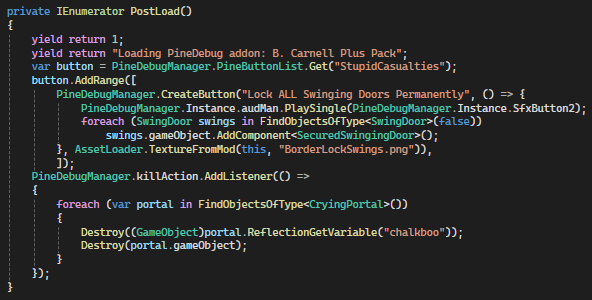

It does simply work, all it does is that it inserts a new button to the Stupid Casualties page and also adds in a new delegate for the /kill e button in order to properly destroy Mr. Portal Man's spawned output portals.

There is no need of patching the PineDebug manager itself (unless that said feature is unavailable) so add in PineDebug support if you need to.

Themes

This feature was probably requested twice but I was actually thinking about implementing them. Themes got added in v0.2.0 of PineDebug and they're community-creatable, they are for the flavor of style or if you do not like Carnell Blue all day.

JSON Variables

  • `themename` - Name of the theme
  • `themecreator` Author of the theme (That's gonna be you alright?)
  • `overridesounds` - If true, `Button1.wav`, `Button2.wav`, and `deathofall.wav` will replace the sound effects used in PineDebug, they all must exist if this option is enabled.
  • Hexademical Color Assignable (#RRGGBBAA)
    • `maincanvascolor` - The background color of the PineDebug menu, it's blue after all...
    • `covercolor` - The background color for the button container, it's grey after all...
    • `gridcolor` - The color for the menu "heads" that are scrolling up and down, you pretty much know that by now. If setting, the image must be white n' black shade in order for the colors to be overridable as expected.
    • `cursorcolor` - The cursor color of the PineDebug menu, doubt that it is blue after all...

This isn't a guide but it explains on what they do throughout PineDebug.

Thread below has informations.

Just as you know...

This isn't how it works...

It's just I've released PineDebug on Itch.io officially, so not many needs to depend on this.

This seems to foreshadow the official Itch.io release of mine...

Recommended Characters Pack references an outdated PineDebug version which the current version of PineDebug changes most fields to not be a getter or to switch them into readonly.

I ran the game with this mod without Level Studio and it went me through the loading process, I need more explanation for this if you provide the player.log file in %AppData%\LocalLow\Basically Games\Baldi's Basics Plus to see the cause.

If your level studio and level loader is out of date, then why is this my problem?