Thanks so much for playing and for the feedback! What kind of performance issues did you face in the shop? I haven't heard someone mention those before so would be keen to hear about them and try fix them
ajwcw
Creator of
Recent community posts
Cool idea for the game! Fast paced maths to keep the counter ticking was fun. I think making the game clearer and giving the player some feedback once they hit the goal would be nice. It took me a couple of games to work out how the game actually worked so maybe a little tutorial before the game starts. Good job!
Cool idea for a game! I enjoyed the simple loop and adding complexity with extra bombs. I was a bit confused by the timings of the bombs for a while and feel it didn't explain that bombs of the same time could explode next to each other. Also there were a few spots on the grid, particularly at the top, where I couldn't place any bombs.
I wonder if setting the bomb timers to longer and having them tick down as soon as they spawn onto the grid would be fun. Then it'd be a bit more frantic and the countdown would be a more integral part of the game.
Once again though, cool game!
The idea is you want to try score as many points as possible without ever beating your previous rounds score. This isn't explained too well though unfortunately.
You want to score as high as possible in the first round and then aim to score high but not quite as high in the next round. Then keep doing that until you eventually lose
Thanks for playing! The aim is to score as many points as possible without beating your previous rounds score. I appreciate this isn't explained too clearly!
The idea behind the shop is that you can buy balls but the cost comes out of your last rounds points, meaning you have a lower threshold for the next round.
Thanks! The idea is that on the first level you want to try get as high of a score as possible and then get lower every other round!
The aim is to get as high of a score as possible overall without ever beating your previous rounds score. Your high score is calculated by adding each of your rounds scores together at the end. I do think this could have been explained better!
Try playing like this where you aim to get as close to your previous score as possible without ever beating it.
Thanks for playing & for the feedback. I have heard that piece of feedback before and plan to implement it while developing the game going forward!
I have been working on some graphical changes to the game which I'll be publishing once the jam is over. I'm then going to work on developing it further into a full fledged game so watch this space!
Thanks for the reply. The idea with the undo button is just to let you jump back a few turns in case you hit the wrong button or realise you've gone wrong on one of the puzzles. I played around with the idea of capping the length of the undo but I didn't want to make the game unaccessible to anyone so I left it endless. It's definitely something to consider and maybe I add it as an option in a 'accessible' mode option in the menus going forward.
Ah thanks for the explanation! I hadn't considered that you were entering a tile that was already at 0, moving off of it and then undoing back over it. This is because I'm just checking if the grass length is less than it's 'maximum length' and increasing it if it is. I need to implement something that confirms if you have just mown a piece of grass on that turn to resolve this. Thanks for the feedback, I will add that to my list of bug fixes!
Oh really? Each tile has a 'maximum length' to it which is set based on how long the grass starts. If you mow a grass down from 1 length to 0 length and then undo over that grass then it does put the grass back. The idea of the undo move is to let you go back to previous moves, meaning you can correct a mistake without having to start again.
Is there a bug in there which allows you to abuse that and do something you don't think you should be able to
Thanks for the suggestion! I'm thinking going forward I might make it so that once you complete a puzzle it is locked and marked as completed. That means the whole vine attaching will disappear and I'm also thinking anywhere the vine-door it opens is not on screen there will be some camera movement to show what you've just activated . It is a great bit of feedback though as I do agree when a puzzle opens two vine-doors or a vine-door off screen it is confusing as to what you've achieved.
Thanks so much for playing and for the feedback.
Please could you elaborate on what you mean when you say you could 'redo' the tiles at the border? This sounds like it might have been a bug that I missed!
Also could you let me know where you managed to get softlocked? I thought I'd tested this well and by using undo you should always be able to get back the way you came and avoid the moles!
Thanks for playing! The camera zoom out was actually surprisingly easy to implement. I essentially just took the camera out of my 'player' node and attached a script to it. I then set a variable called target position in the camera to the players position and in the process function slowly moved it to match that target position. Once the player collided with an area2d I setup in the centre of the puzzles the cameras target position would zoom out to match the zoom and position I manually set. Finally once the player moved out of that area2d I set the target position back to the player!
Thanks so much for playing and for your feedback! I have had the feedback about the reset buttons being too close a few times now. I was planning to 'lock' a puzzle once it has been completed which means you can walk over it again without ruining the solution. I hadn't considered a confirmation button on the reset tile though, that might actually be a better solution.
First of all thanks so much for playing and for your feedback! I'll address your gripes below in reverse order (should make sense why once you read them).
Gripe /2
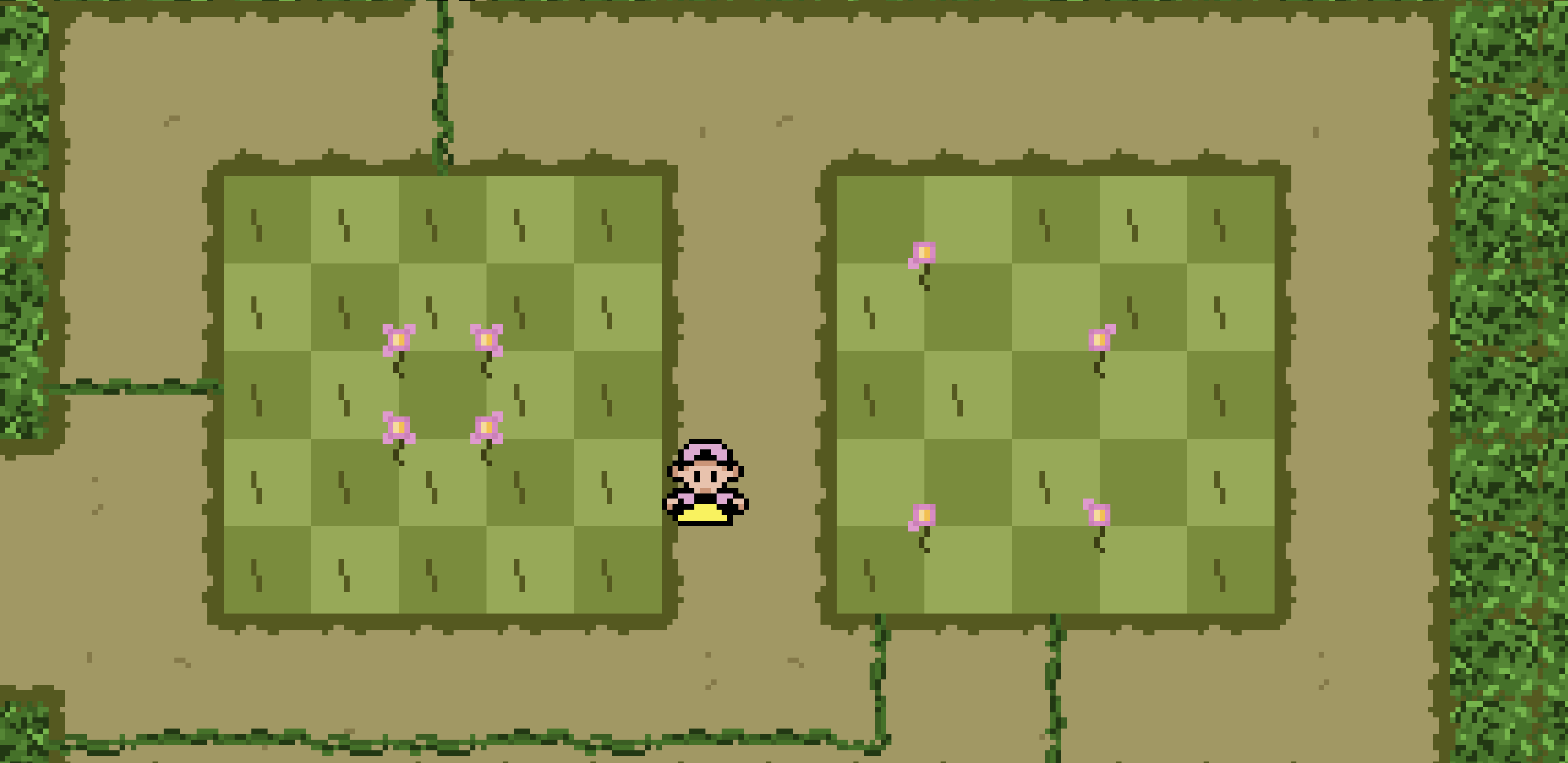
It would appear you have found a glitch/error in one of the puzzles, specifically the one on the right in your screenshot. I will explain the rule of the flowers below so anyone reading this who wants to go in and play it first stop reading now! You've been warned...
The flowers represent which of the tiles diagonally should have 1 piece of grass and which should have 0 pieces of grass on. The flowers in the left puzzle indicate that the central tile should have no grass and all the others should have 1 piece. That means that the puzzle in question should be solved like it is below. This issue is this puzzle seems to only be checking how many tiles have 0 grass on and not where they are located on the puzzle! So your solution works as it has the correct 12 tiles with 0 grass on but the flower rule is essentially being ignored by the game! I will get this resolved and ready to push up once the jam deadline has ended!
Gripe /1
Now the flower rule has been explained. I created the mole puzzles before the flower puzzles and only added the latter in right at the end of the jam. I therefore decided to add the flower into any previous puzzle that featured grass tiles with 0 pieces of grass on, essentially just to keep the rules consistent across the whole game. I never considered that someone would see these earlier and believe that they were a puzzle mechanic so thanks for pointing that out. The hope was that you'd just think they were flowers but then once you got to the flower section you'd remember seeing them and realise then. The intention was that those final two mole puzzles are solvable without needing to understand or interact with the flowers. I realise now that's one of those things obvious to me as I built the game but not to a player so thanks for pointing that out!