

After searching a little for a tutorial of how to play this amazing game on GNU/Linux with no success at all, I decided to share a simple step-by-step of how to achieve it (and playing soooo smooth!):
UPDATE 12/08/2025: you can check it out a super basic video of how to do that:
- Download the game and unzip it to a folder. For example: /home/<you>/Games/VotV/
- Open Steam and click on "Add a game" option (at the bottom-left of the main windows of Steam)
- Click on "Browse" to open the folder where is located the VotV.exe (following the example: /home/<you>/Games/VotV/pa07_0011/WindowsNoEditor/)
- Once is selected you'll find it under the "INSTALLED LOCALY" section of your games library as a "VotV.exe"
- Select it and click the gears icon and select "Properties".
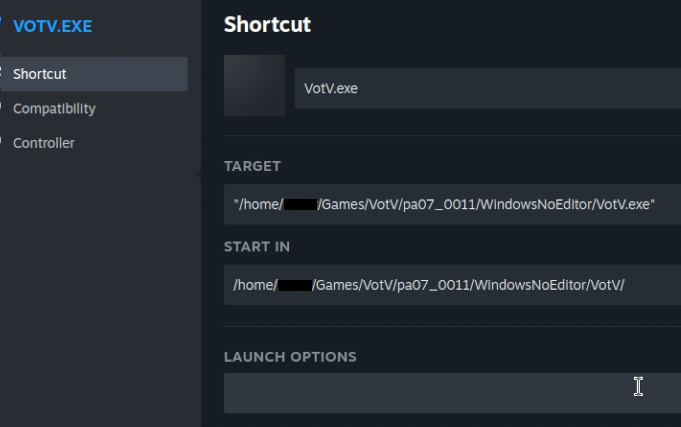
- It open a new window where you have to set two paths as you can see it below:
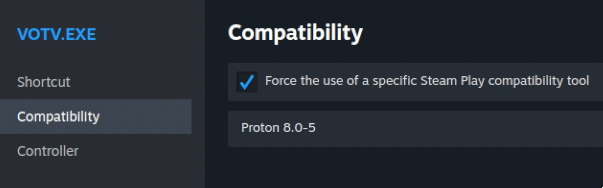
- Don't forget to open the "Compatibility" section to force of using Proton:
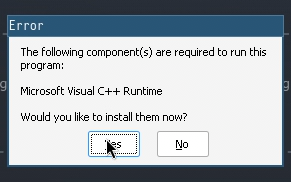
- The first time it'll raise an error of lacking of MVC++ Runtime. Say "Yes"
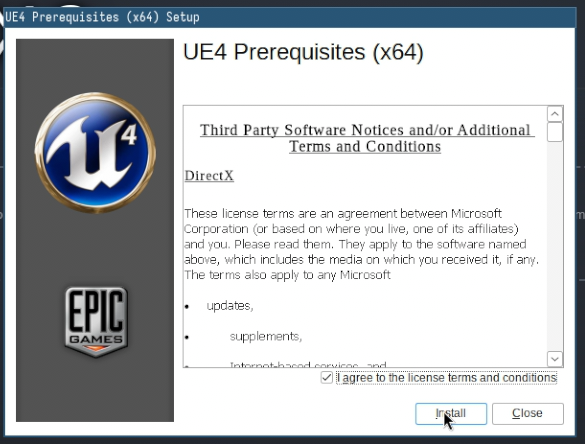
- Wait unitl the installation is completed
- Enjoy!