

I'm having issues getting the game to start. I don't know what files I should use when I downloaded the Windows version, since there are so many even in the Windows folder. And when I click on one of the Python files, a command screen comes up. If I type in anything, I get an error. Help?
4 years ago (+2)
The simple answer is: To start the game, use either "Ravager" or the "Ravager-32" application file depending on your system type. Otherwise...
Ok, so that is a very basic Windows question, so I'm going to walk you through this as if you are new to Windows entirely:
Index
1. After downloading make sure to...
2. How to Extract a compressed/ zipped folder
3. How to find "system type"
4. How to start the game on windows.
1. After downloading the file make sure to extract it to the desired location as it is compressed at first as most game downloads are. Doing this simple step makes playing the game much more enjoyable, functional & stable. Most raw games won't even run unless they are extracted first and foremost.
2. Extracting a compressed folder: After downloading the game just right-click on the zipped game folder and select "extract all..." Put it in the desired location from that menu. This should be done before running the game.
Do note: That this method does not work for .rar or 7z file types as you will need a separate program to extract those. Windows does not support extracting 7z or .rar anymore by default.
3. If you are not sure what architecture your "system type" is:
Use the search bar (magnifying glass icon) next to the start menu (Window icon) on the bottom left of your screen for "System information" and it should take you to a screen where you can view all the bells and whistles of your device.
Alternatively you can right click on "This PC" and select "Properties" while in file explorer. Which will also take you to a screen where you can see "System Type."
4. To start the game for Windows after extraction:
Open the folder where you put the extracted game folder until you see the menu below. Select & double-click either "Ravager" or " Ravager-32" application file depending on your "system type". The file should have a character icon with pink hair holding what looks like a Koopa from Mario.
Do Not click "Ravager.py" or "Ravager.sh" (These are for more advanced administrative developer systems. Not for Windows basic users.)
Use "Ravager" = if your system type is x64-based PC or better
Or "Ravager-32" = if your system type is a x32-based PC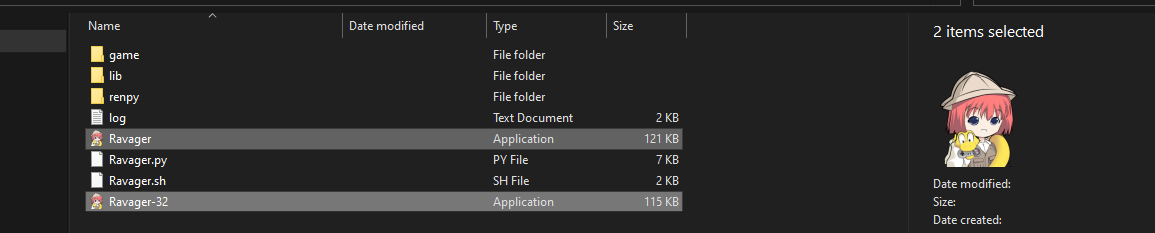
- "Hope this small 'how to' windows guide helps..."