

The Particle Generator - 30/05/2018
Greetings fronds, and welcome to another episode of "I do things and pretend there are strangers that are interested"
On todays episode I begin my journey into the particle generator.
So the above is actually a little untrue, I have a super basic particle generator class that i threw together the other day to test the concept. That's probably a good place to start, so lets take a look at what we're dealing with before we look at what we're changing.
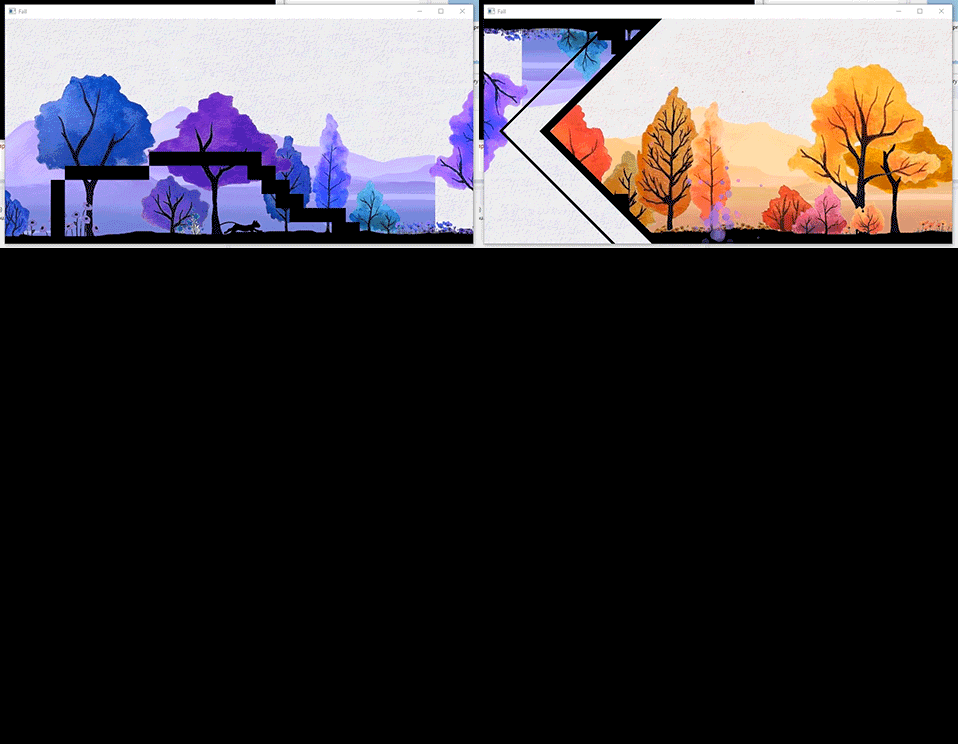
This is what I started with. It's not bad really, although very basic. I've refined it a bit since then in terms of how the physics are applied and now what I have is this
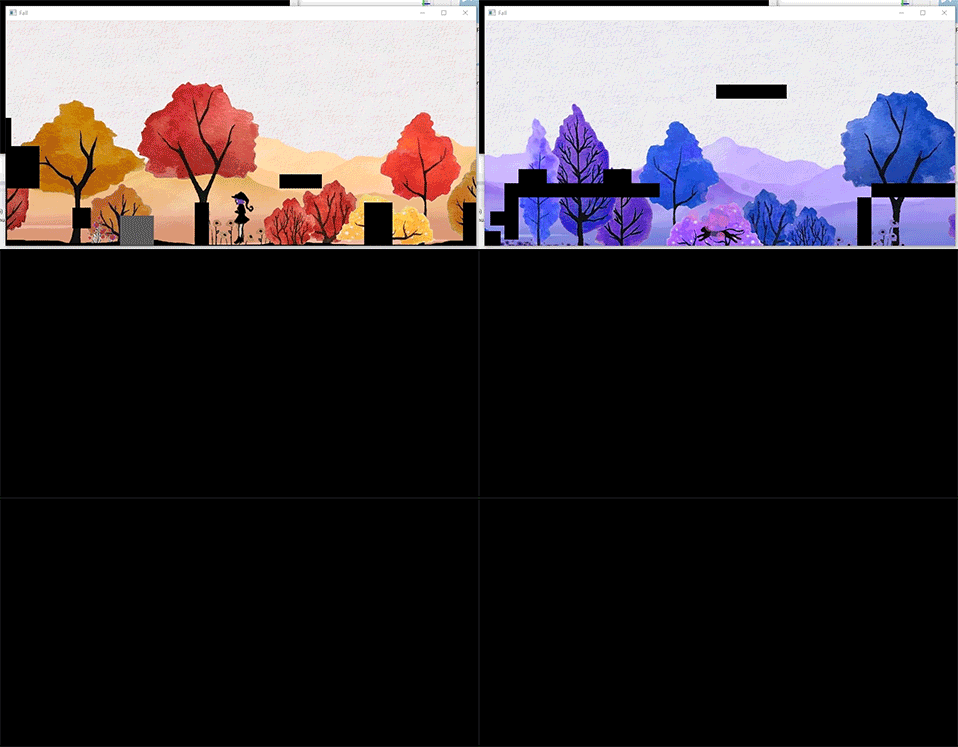
You're probably all 'thats the same...' but hush! It isn't! In the first gif the particles are heavily impacted by their size, the smaller ones are lighter that the bigger ones, and so are flung further. In the second gif you'll see they are travelling about the same distance no matter what their size - much nicer, much easier to control. I still have a fondness for that first iteration, with it's hectic flinging of digital sparkles across the screen, but i have a penchant for chaos.
Lets pop the hood and take a look at whats happening here. I downloaded snagit for this, appreciate my efforts.
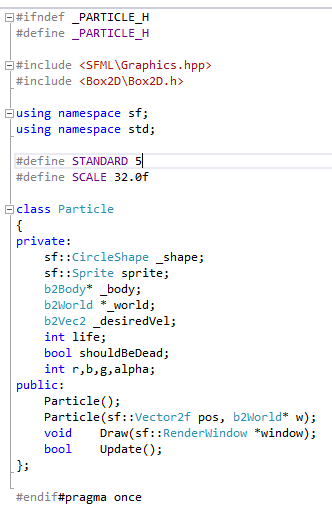
That is my particle class. This tells us a lot about what I'm doing so far - I'll tell you up front it relies heavily on hard coded parameters because I just wanted to get it up and running. We'll change this, eventually. Alright, so we have a circle - cool, so our particles are always circles. We have a sprite - not current used by anything, but the beginnings of a better world. The next three are b2 variables - necessary for the use of box2D physics. Life represents how long the particle sticks around for, shouldBeDead is a flag to indicate the particle needs to be removed from the list, and then some ints for rbg colour and alpha value. Nice. Other than that, the particle class doesn't have much going on. Lets look at the cpp side
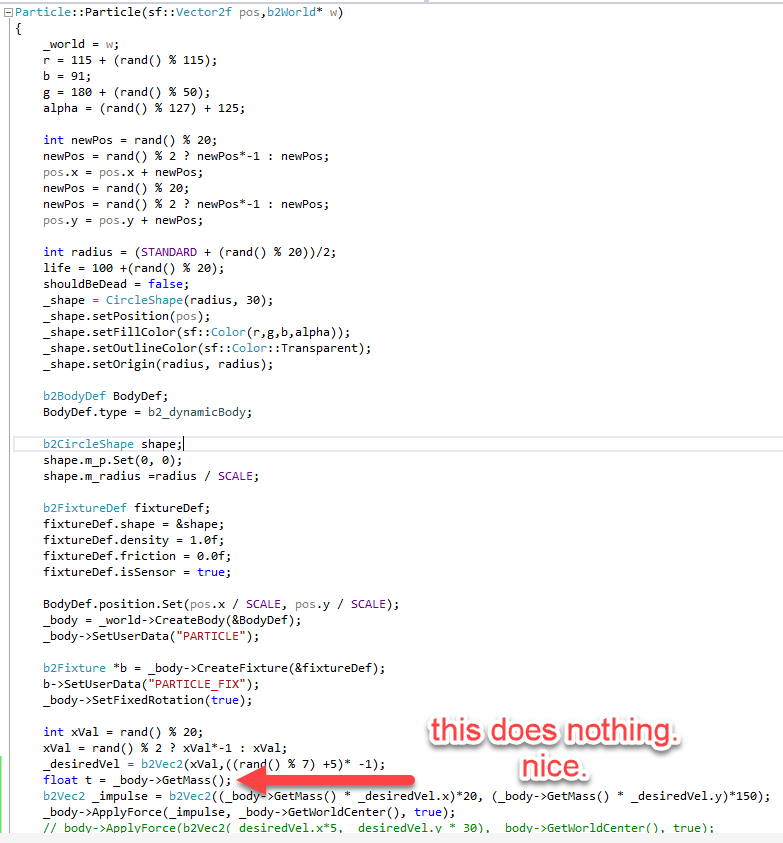
Okay, so that abomination is the constructor - told you there was a lot of hard coded junk. Lets break this down real quick:
First I'm setting the colour I want for the particle, it's got mods on it so I can get a random shade within a colour range. I used paint to figure all these out, but as you can see there's no dynamic way to change this.
Next section is defining the basic details - sf circle shape details, life, basic stuff like size, position, and origin. You'll also notice I set the colour in the wrong order, that's a happy accident I left in because it results in those bright flashes at the creation site before the particles are reset to their proper colours later in the update function, but we'll get to that.
Then we have the box2D stuff, the density is relevant later in the mass calculation, but other than that these are pretty standard. You'll notice the size and position all get divided by SCALE - that's a fun box2D trait where it doesn't use pixels but sfml does so you gotta do some witchcraft to line them up or everything dies.
Lastly we have the actual particle effect - this is arguably the most important part of this entire class. This part, in combination with your box2D settings, give you the particle effects. I'm setting up an x and y value with mods so i get a varied spread. Then we do some maths with the mass to make sure the big ones and the small ones are all treated equally. float t is just there so the cpu can do some extra redundant work, because of course. Then we use the calculations to apply the force multiplied by some magic numbers to increase their strength. Fun times, right?
Sweet. Lets look at the update function then that's this class done.

Alright, so you can see we reduce life to count down to the particles death, we reset the desired velocity off the current velocity (not actually sure this is needed, we'll try it later), then update the sf circles position to match the b2 body position. That step is really important; the sf shape is how you see your particle, the b2 body is invisible but it has physics acting upon it so you have to make sure your sf shape tracks to it or you cant see anything happening. I'll show you, hold on
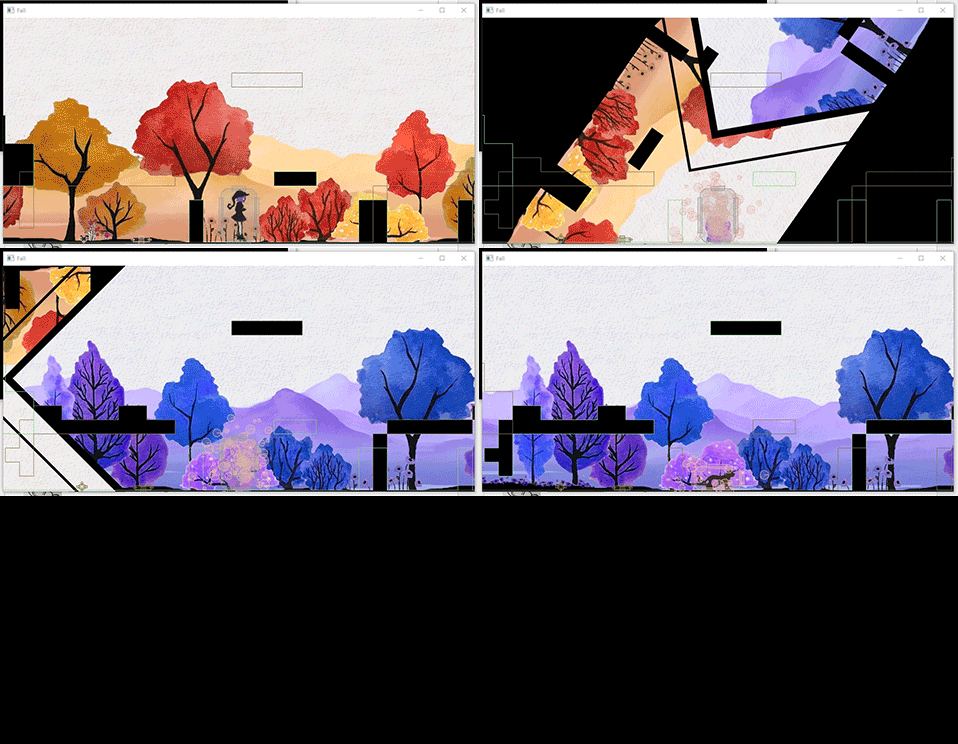
I only changed two lines to get that, one to turn debug draw on for box2D and one to stop the particles from setting their position. You can see the box2D bodies keep going, but the shapes don't follow them. It also looks slower because debug draw is rough on processing. The interesting (and arguably bad) thing about box2D is that I have no input into the calculations and movement - it self manages it's assets from the Step function call run from the main game loop 'update' function. That means I can't really pause any of my physics on certain objects, only on the game as a whole. That's a story for another time though.
Okay! So that's my particle class - lets look at what's calling the shots for them.
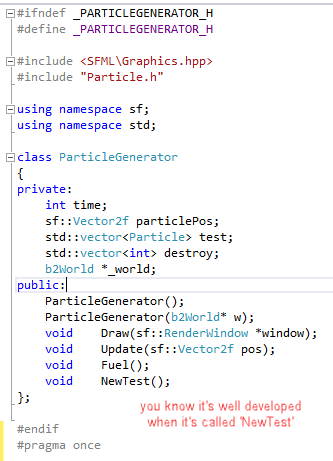
Mkay, so it should be immediately apparent to you that this class is made to handle one instance of a particle source. It has a single list of particles, this is used to update and draw, it has a position and time - position for new particles to draw at and time limit that runs the fuel of new particles. Enough of this, lets take a look at the cpp
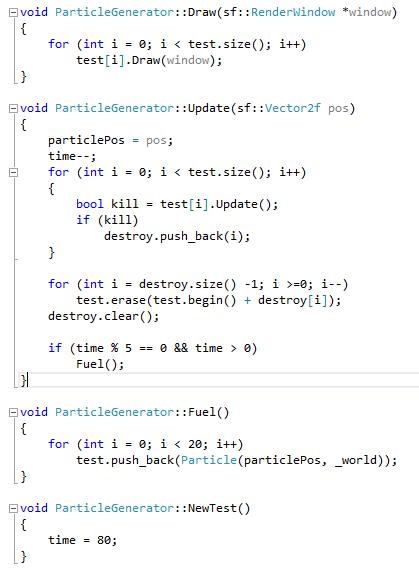
So draw is looking alright, good job draw. Update is pretty straight forward - a position is passed through (in case the spawn point is moving), the time depletes, the particles are updated and during this they return a bool to let the generator know if they're past their time limit. If they are their index gets added to a second list so I can remove them later, then I loop through the second list backwards to remove them. Why backwards? Well, say i have indexes of 1 and 5 to remove - I remove 1 easily enough, the vector is shortened, then I try and remove 5 - exception is thrown because 5 isnt a valid index anymore. And if that 5 were a 3 I would end up removing the object that used to be 4. Backwards means the highest indexes are removed first, so the lower numbers are still accurate.
If the timer mods 5 nicely then I add some fuel to the generator - seen in Fuel() I just add 20 new particles, 20 is a number I felt like using at the time. a timer of 80 is also a random number I decided would be good.
SOOOOO
That's where we're at. All these magic numbers mean I can't customise my particles without code changes, I can't use textures, I can't animate the particles, I'm stuck with circles, I'm stuck with pinks and purples, I can't run more than one at once. So many issues.
What's the plan then?
This will evolve as I think of new stuff and restructure things, but as a starting point the goal is as follows:
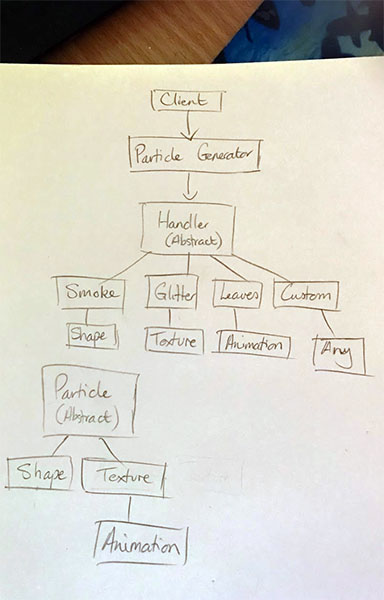
A client will have a single Particle Generator - this is the class that creates particle effects and manages all particle effects currently active.
A Particle Generator will have many Particle Handlers - these are specific types of particle effects. I will have an abstract handler that all other specific handler types will inherit from, and this will allow me to keep pointers of all the handlers in a single list. It also means I can write templates for specific effects if I want to, or I can customise one through the code. As much functionality currently in the particles will move to these handlers so that the particles themselves are very basic objects.
A Particle Handler will have many Particles - similar to the existing version, but more generic and with a lot of the work moved into the handler. There will be an abstract Particle class that has basic details, but then 3 different implementations of that class to represent the different types of graphics that may be needed. There's no need for a particle that is a simple sf shape to have animation functionality, so that will be in it's own implementation.
The goal here is to make this usable in other projects - modularity is great, and lets you build mock ups very very quickly.
Okay, I'm going to go and set up those classes, and in the mean time I'll post this because I'd hate for it to get lost. I'll update it when I'm up to the next part!
The Next Part - 01/06/2018
I am back! Alright so my classes are (mostly) set up, and I'm in the process of using the Smoke generator to iron things out and figure out what may need to change before I implement the others.
Here's a clip of what's currently happening - heads up, it's pretty underwhelming
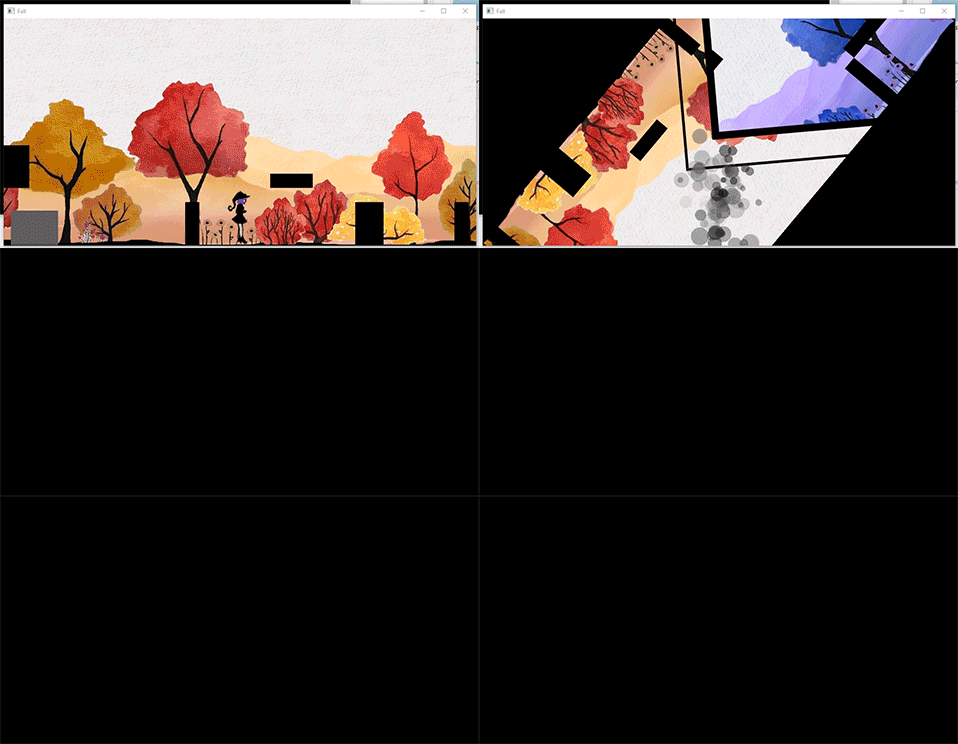
Looks pretty similar to what I had before, but grey - right? I know. Lets take a look at how the structure has changed though.
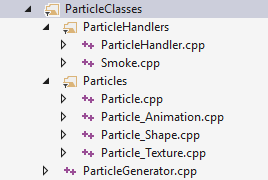
So these are my files. Smoke inherits from ParticleHandler and is set up with presets that will create a smoke effect (eventually). Then we have our 3 different kinds of Particles which all inherit from Particle.
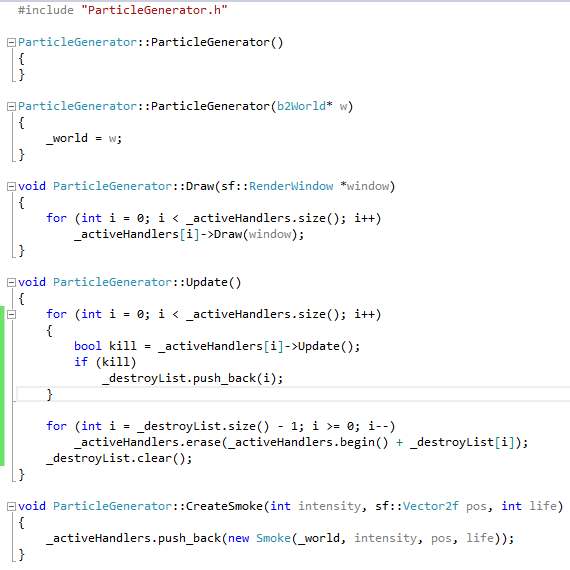
Below is the new Particle Generator. You'll see it's now dealing with Handlers rather than with particles directly. The client gets one Particle Generator that will keep track of all the active handlers - handlers are responsible for the particles associated with them. This means one of our goals is complete - we can have more than one particle effect in play at a time! You'll also notice it also controls the creation of effects - like the CreateSmoke function at the bottom. This way you can simply ask the generator for a particular effect and pass it some simple details and it takes care of the rest.
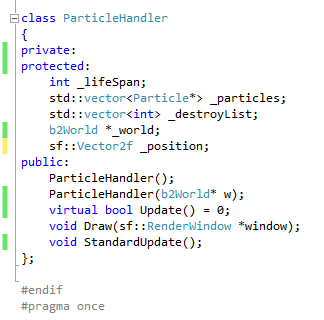
Handlers act as templates for particular types of effects. They do all the heavy lifting and need to be configured correctly or they won't work at all. I've started with Smoke with inherits from a generic particle generator -
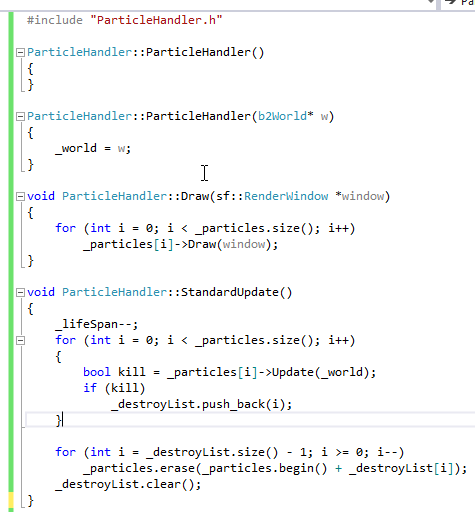
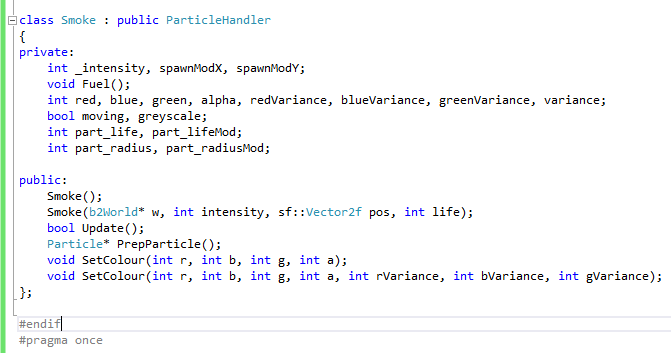
Smoke uses the generic draw provided by this function, but implements it's own update then calls back to the generic update to do the universal clean up steps. As you'll see below; smoke adds a lot of it's own variables. I could group them all to one line, but I've grouped them in a way that's logical to me. moving, greyscale, and the colour mods arent actually being used yet but I'm preparing them for the future when I might want to change the smoke colour, or get it to move in the wind.
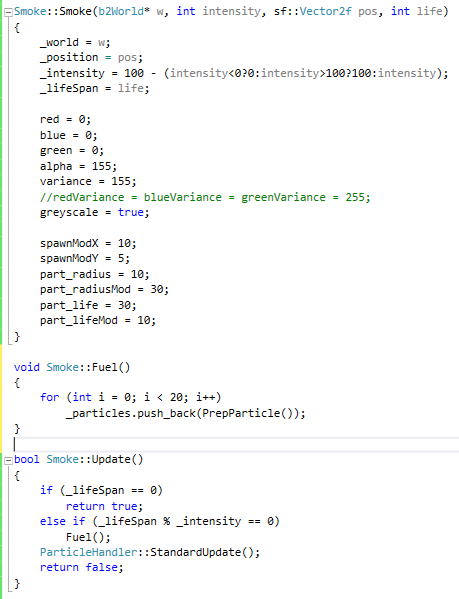
You can see below that most if not all of the variables are set to default values - these will change while I'm developing the effect but by the time it's done they will be standard settings for a nice smoke effect.
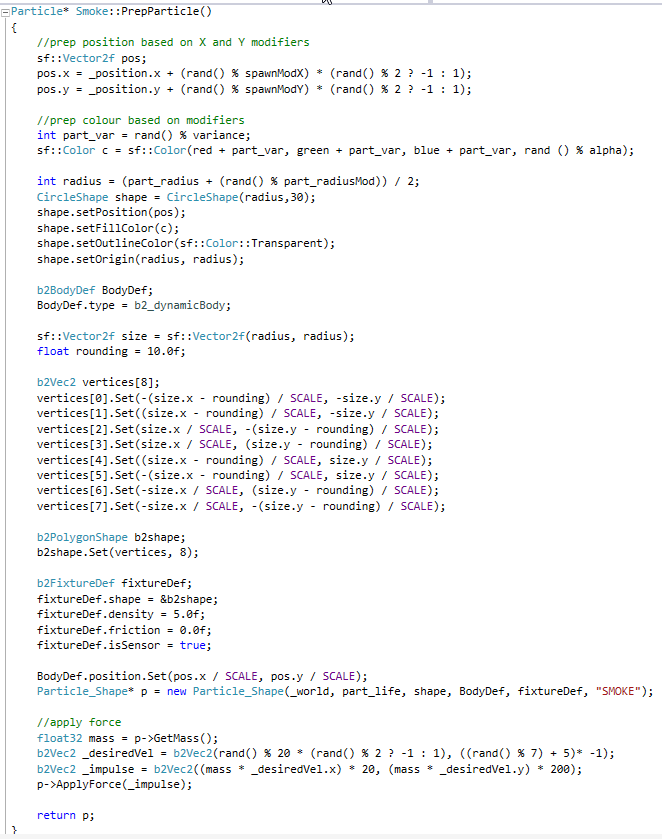
Prep Particle has taken all the hard work from the particle and ensures that the particle is given all the details it needs ready to go. Eventually I will move the box2D work out of here into a base handler class to neaten things up.
And lastly we have our particle base class
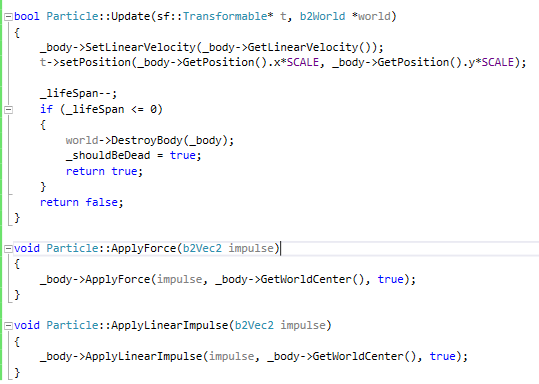
And the shape implementation
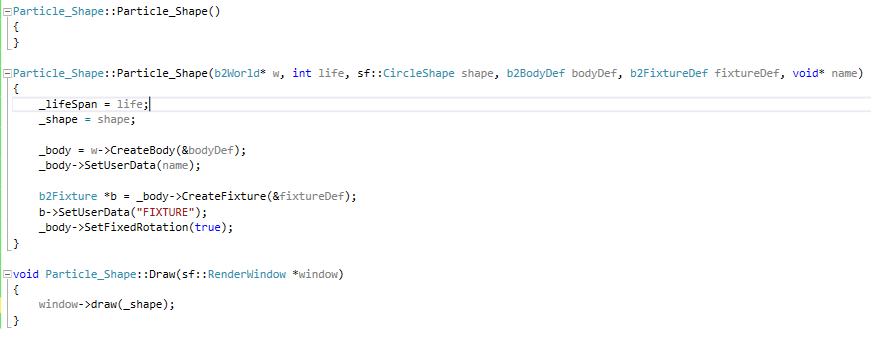
As you can see - these are a lot less busy than they used to be. By moving the complexity into the handler I allow the particles to be used by many different effects.
Okay! You're all caught up class wise - so where are things going wrong? Well, I don't love how fast the particles move at all. They're meant to be smoke, and to me smoke is lazy and drifting not a crazy explosion. In terms of slowing them down, it's kind of tricky because they're attached to the box2D world that everything else lives in. Fast responsive physics is great for my player and the enemies, less great for smoke. Changing the variables like friction, density, and the forces can only do so much because they're all kind of interlinked. I can boost the density, but that impacts how far they move, I can increase the friction, but that only matters if they're in contact with other objects. I have two things I'm going to try - the first is to see if I can redeem box2D. If that doesn't work I think I'm going to remove the physics part and just program the particles to act like I want them to.
Option 1
So as I mentioned; the particle physics exist in the same box2D world as everything else. I can change the frequency of the world step, but not without also slowing down my player and enemies and all that stuff I actually need to have good and responsive physics. What I'm wondering though (and I have no idea if I can do it) is whether or not it will be okay for particle handlers to get their own world. That way I can speed them up or slow them down and not worry about impacting anything else.
I'll give it a shot and we can review the outcome. brb
Okay, for you it's been 0 seconds but for me it's been like half an hour and here's the update
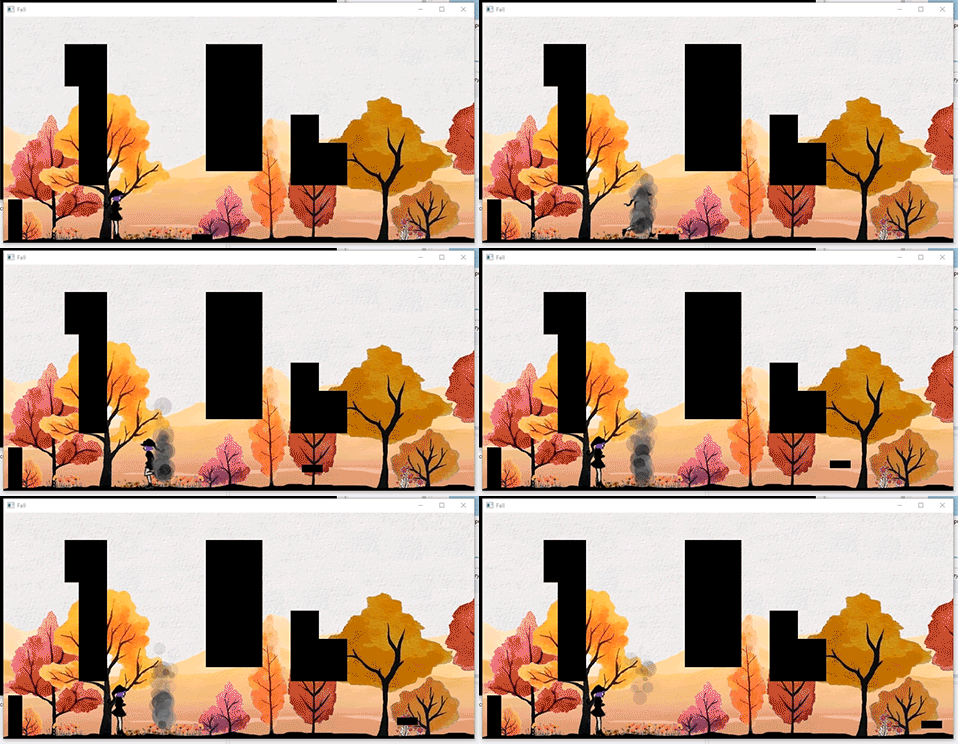
Just a little bit different :P
So what did I change to get that? Well as planned I gave the smoke handler it's own b2 world to live in. The only way that could cause complications for me is if I wanted my particles to interact with the other world objects. Pretty sure all my particles will just be visual nothingness though so thats all good. A separate world meant I could set it's own gravity, too, which is why they don't fall down anymore. I could have intervened and reset the y linear velocity value every time which would have done something similar, but this is easier and far more customisable.
I realised that the smoke was looking strange because it was always moving at full speed so I created two new variables in the Smoke class, one for currentStep that starts at 600 and one called desiredStep which is at 200. You can see the update function below, and you'll see that the currentStep value moves closer to the desiredStep every update, starting the smoke slower and moving it to full speed.
I also moved some things around to support the handler staying alive even when it's life span timer is 0, this is to allow the particles to fade out naturally rather than suddenly stop when the handler is dead. I also have that super long line that adds a little bit of variation to the smokes path. It will definitely need to be tweeked more later but I like it for now. That line is also why I moved some particle looping into the smoke class from the base class.
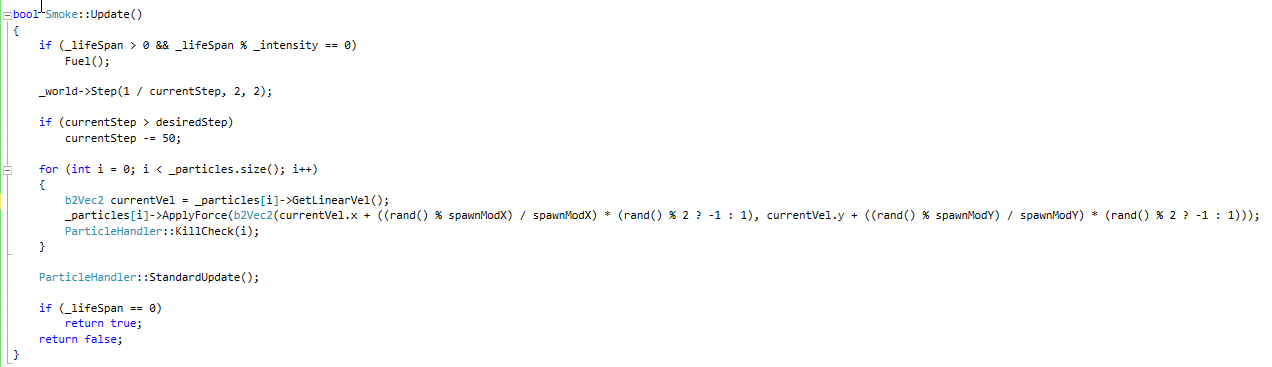
To support smoke fading out I also added a variable to the Particle_Shape class so if you pass life in as 0 it will set a boolean value that triggers the alpha value to be reduced on each update and will let the particle live until the alpha value gets to 0 (no longer visible).
And that's it! the Smoke handler is primarily done now, all that's left is to improve customisation options and get the colours in place. I also want to modify how dark the smoke is based off the intensity (which also controls how often fuel is added) and add fuel more smoothly as it sometimes looks a little jumpy. I'm also considering setting up the ParticleGenerator class with some threading so that the rest of the game is unaffected by the particles being drawn. I'll update again when I've got the texture particle ready to show you!
<3 bye!