
Indie game storeFree gamesFun gamesHorror games
Game developmentAssetsComics
SalesBundles
Jobs
TagsGame Engines

First of all, thanks for the feedback.

What exactly do you mean by the mouse having to be close to the player? The mouse actually just needs to be positioned over the player to jump, regardless of the distance.

The mouse doesn't have to be directly inside the circle, the circle is just there to indicate the direction the mouse needs to move for the movement to be detected, the distance doesn't matter.

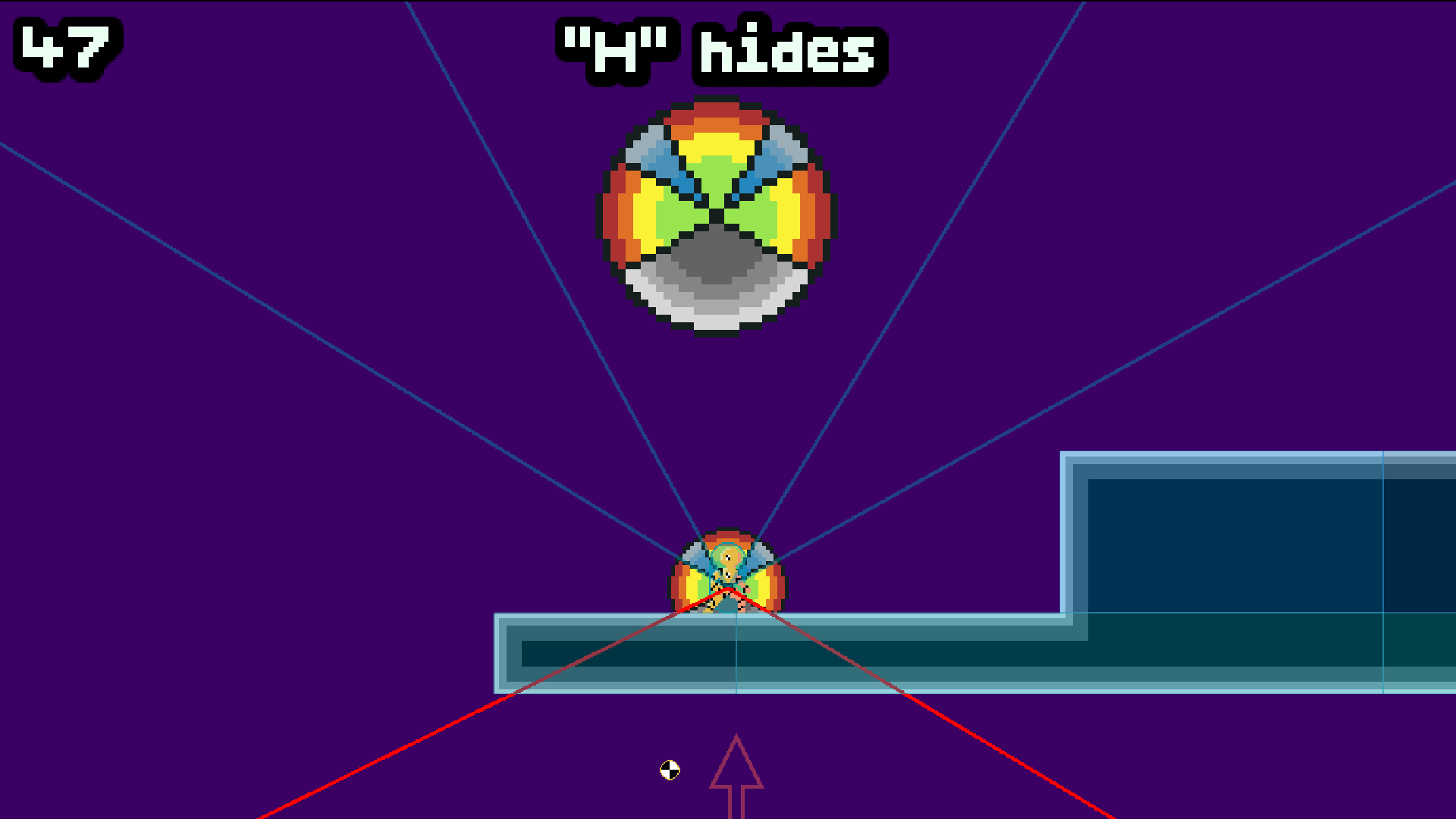
So, I found that I naturally wanted to have the mouse near the right side of the screen. When its at this distance, flicking up to jump seems to be less accurate and I have to move the mouse closer to the player to get better jumps. 

Trying again I was able to get past the tutorial!

Ignore the arrow at the bottom.

Basically, there are three zones left, right, and jump (I’ve indicated them here with blue lines). If you’re between the lines, you move in that direction, but if you want to switch from running right to jumping, you can't just move the mouse straight up, because that doesn't get you into the jump zone, do you see what I mean?

That’s why it feels like you have to keep the cursor close to the player.

(+1)

Ahh I see. Thanks for explaining

Your very welcome