

Unfortunately, that didn't seem to work. Just made the screen black - still not fullscreen - but can still interact and control the game.
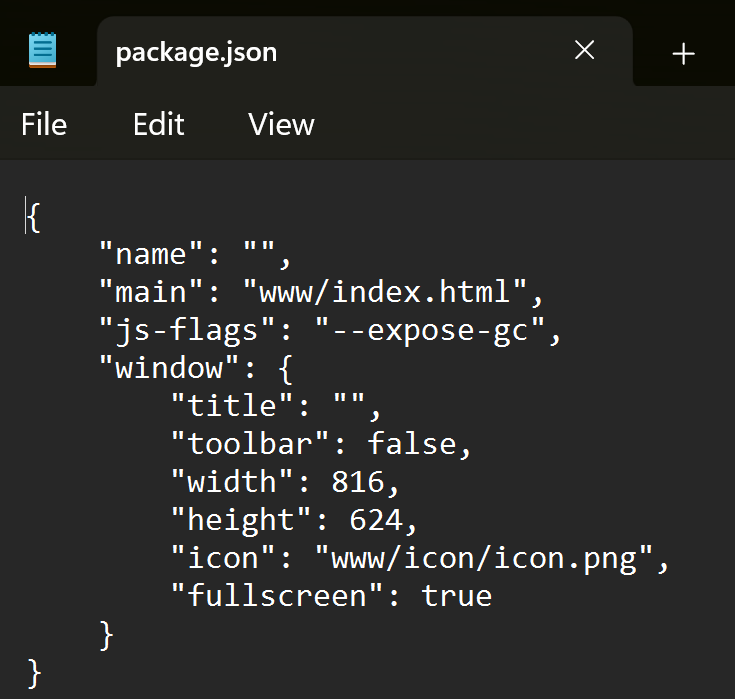
Is that right?
I tried modifying a couple of files and installed a full screen plugin, but it doesn't seem to work.
However there is a workaround. You can use a script to launch the game which will simulate an F4 key stroke after it's launched. Copy and paste the following code to a notepad, choose save as, select the file type as "all files" and then save it as BlackmoonFullscreen.bat (or whatever name you want, the .bat is the important part) in the same folder as the Game.exe file.
@echo off
start "" "%~dp0Game.exe"
powershell -NoProfile -Command ^
"Start-Sleep -Seconds 1; ^
Add-Type -AssemblyName System.Windows.Forms; ^
[System.Windows.Forms.SendKeys]::SendWait('{F4}')"
After this, just double click the .bat file and it'll go fullscreen. You can even have a shortcut to it and change the name and icon to something else (you can use the icon located inside www /icon/icon.png and convert it to .ico)
Hopefully this method is not too complicated. There are other alternatives like autohotkey as well, but the script above works out of the box in windows.