
Indie game storeFree gamesFun gamesHorror games
Game developmentAssetsComics
SalesBundles
Jobs
TagsGame Engines

Changing fonts in alert screen and for buttons?

A topic by Svantlas created Nov 19, 2023 Views: 462 Replies: 4
Viewing posts 1 to 2
(1 edit) (+1)

How do you do it? I can't access the text menu while editing them. I have seen other decks do it, so there must be a way.

Edit: Ok I found a way using  alert[source.value] and having a field named source where i write the text, but it means that I have to have a field on screen for every text message I want. Not ideal. It would be nice to be able to make it invisible.
Developer(+2)

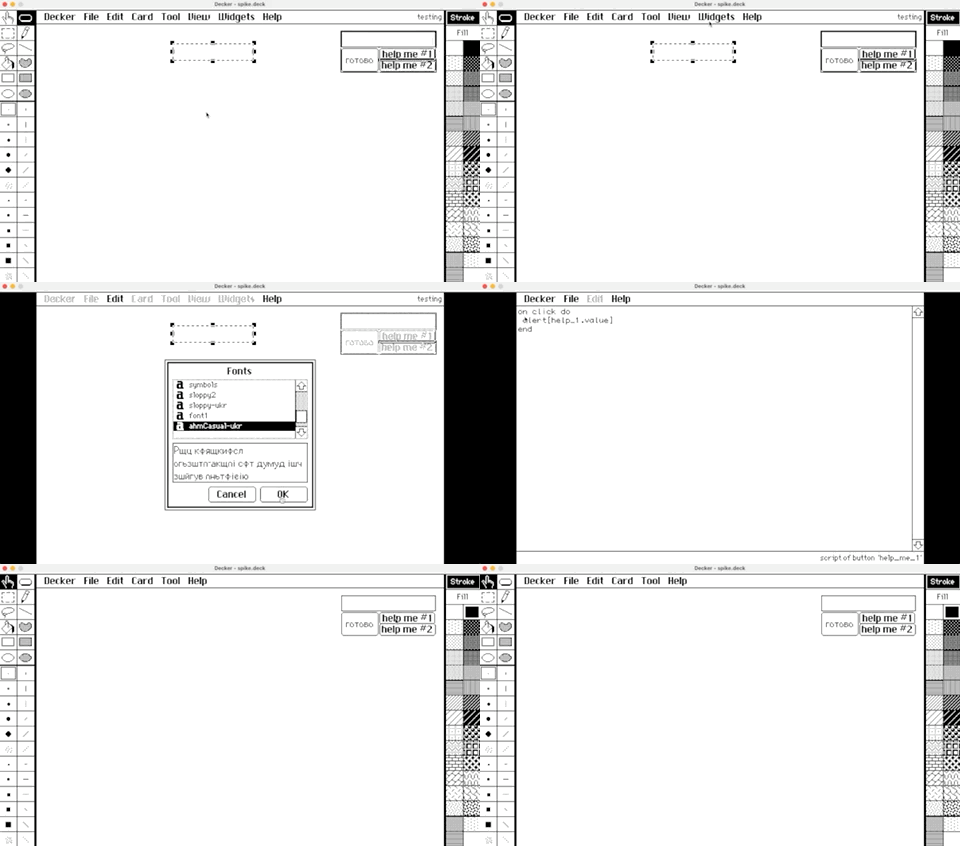
You can make any field (or any widget, for that matter) invisible by selecting it with the Widgets tool and choosing "Widgets -> Show None" from the menu. It's also possible to position widgets outside the visible boundaries of the card, but doing so would make them a real pain to select and edit.

Buttons can only contain plain text, in a single font. You can change the font of a button (or the default font of any widget, for that matter) by selecting it with the Widgets tool and choosing "Widgets -> Font..." from the menu. If you want icons or more complicated rich text "in" a button, you can set it to "Show Transparent" and draw on the card background underneath it, or position other widgets beneath it.

Does that help?

(+1)

Yes! Thank you for your detailed answer.

(1 edit)

Hi IJ. It seems like alert[source.value] doesn't respect the source's font. Also, thank you so much for answering all our questions! 

Developer

The .value attribute of a field is a rich text table. The alert[] function doesn't know anything about the .font property of a field you read rich text from; it could just as easily be a rich text table constructed on the fly by a script.

In a field, rich text runs with an empty string (the default) as their "font" cell are displayed using the font given by the field. The alert[] function always uses the "body" font for this purpose.

One way to get the behavior you appear to want is to write a function which patches all the default-font runs to use a specific font from a field. This in turn requires us to look up the font name from the deck:

on alert_from_field field do
 name:first extract key where value=field.font from deck.fonts
 alert[update font:name where !font from field.value]
end

While testing this example I identified and patched a bug in Native-Decker which can cause crashes when attempting to render a very large amount of text or text with a very large font in an alert[] dialog. The fix will be in the next release, but until then exercise some caution.