
Indie game storeFree gamesFun gamesHorror games
Game developmentAssetsComics
SalesBundles
Jobs
TagsGame Engines

Import pilots from comp/con

A topic by Joajackson created Apr 02, 2026 Views: 1,350 Replies: 8
Viewing posts 1 to 8

Hey, so, I might be blind, stupid or similar, but I have no clue how the import pilot button works, it says to put a JSON into a text space, but got no clue how to. Any help? 

Developer

Hi! I believe that form is actually broken in the current build; it’ll be fixed in the update scheduled for next week.

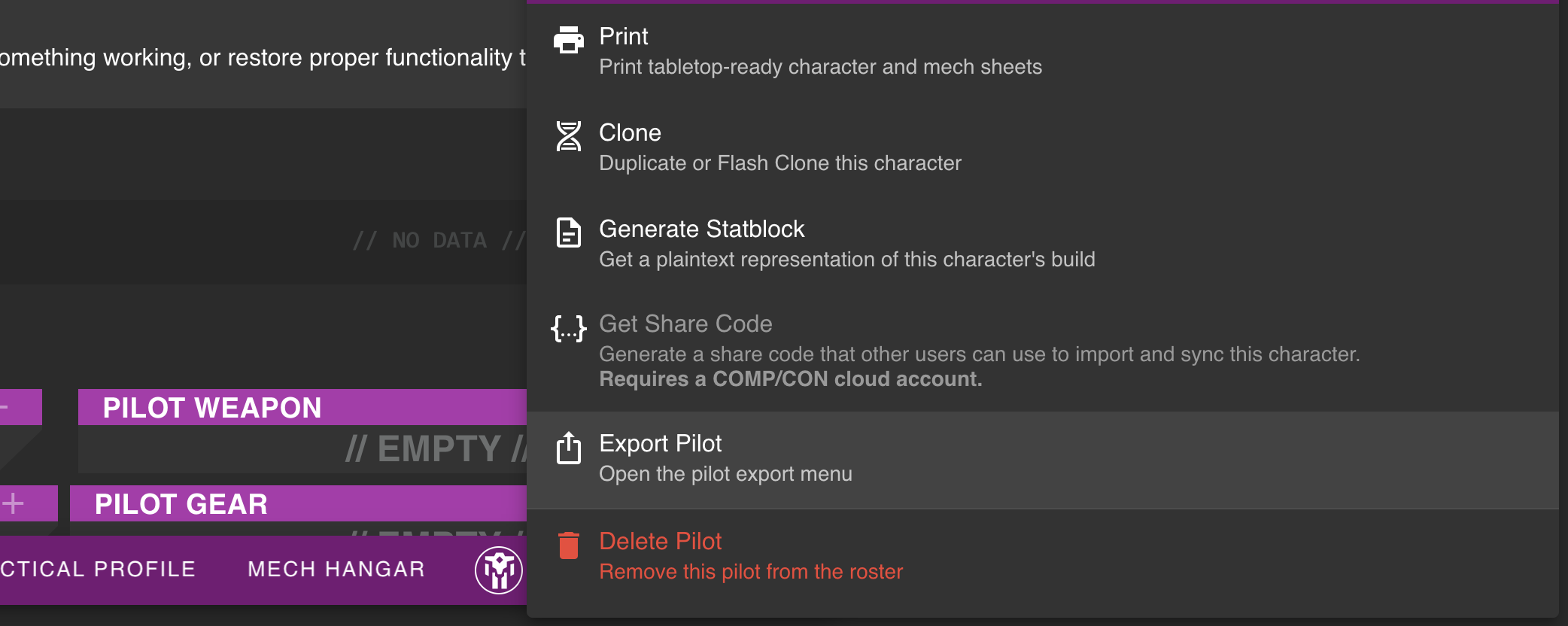
Once it is fixed, there’s an “export” button in the COMP/CON pilot menu, which will bring up a panel that says “copy pilot data to clipboard”. Press that, then paste that text into that textbox in Lancer Tactics.
Developer

Got a preview update out early, so this should now be fixed in v0.6.3

This works mostly with v2 exports. But it looks like v3 exports might not be supported(could also have been non core lcp content).

Also wanted to post here to see if you'll be updating to V3 Comp/Con compatibility with the pilot files.

god i hope so because i cant figure this out keeps saying no mech found

Just wanted to leave a post here as a refresher for the ever busy Olive!

What's the word on this so far?

(+2)

I too am interested in import feature functionality :)

(1 edit) (+2)

A heads up for people asking for v3 import functionality. Download the json file v2 and then open it in notepad++ copy the text out of the file and into the game. Note that you still won't be able to import data that that the game doesn't have.