

I don't know if this is the right place to report it, but I am using the Ferret one with custom colors and since I am on Windows 11 it sometimes "freezes" and creates a black box around the pet as if the program is "busy", but the pet can move inside that black box and make "normal life". If I click on it, windows recommends me to close the app as it is frozen. It mostly happens when I switch between some applications.
I hope this information helps!! :D 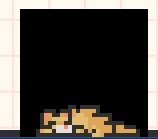
Viewing post in PetBox: Ultimate Desktop Pet comments
Hi! Thanks for reporting this.
Since this looks like Windows is marking the app as "not responding" (freezing the main window loop while some background processes might still run), i would love to get a few more details to pinpoint the bug.
- How often does this happen? (e.g., every few minutes, once an hour, randomly?)
- When the black box appears, does the pet keep physically moving/walking across your desktop, or does it stay in one place just playing its animations?
- Does the issue resolve itself if you wait a bit, or are you forced to close the app every time?
- Does this only happen with this specific Ferret and custom colors, or does it also happen with other pets and default colors?
Any details would be very helpful to replicate this bug and try to solve it!
Hi!! I've tried a few things, I hope this helps!
- It happens a bit randomly, but always after a few minutes after starting the app (like 5-10 mins).
- The black box is the same size as the "hit box" of the pet, so the pet tries to run but cannot move as it has a wall in front of it, but tries to move to both ways and to sleep, seems it makes normal life but not moving outside the black box. That black box does not move, if that appears somewhere in the screen then it'll freeze in that location with the pet doing its animations inside.
- It always starts when sleeping, so when the pet wakes up then the black box is there and cannot move. It is possible to restore its mobility and remove the box by selecting the "relocate pet" in the app icon (sometimes that's not needed, just getting the pointer over the icon without clicking nor selecting anything does the trick).
- I tried with default cat. No issue. I also changed the cat colors to custom ones and no issue either. It only happens with custom ferret colors as far as I know right now.
Thanks for taking care! This is a lovely app!