

This looks so good, but for whatever reason I'm unable to extract it nor be able to find it anywhere on my computer save of an auto shortcut. The file there says access denied and need permission to be opened. So now I'm wondering if I got virus or something because it isn't working. And yes I got the game from this page from the links provided.
28 days ago (+1)
Hey there! This is an official message from the team member of the game!
Thank for your feedback!
From what your current situation then I'm guessing you are trying to run the game on Window.
Another thing that I wanted to make thing clear is that all of the game files from this page does NOT contain any virus nor malware so it safe to say your computer shouldn't get any virus after downloading the game! (Unless if you did run into any virus after download or running the game then please contact us as we will soft thing out by double check the game files!)
As for the "access denied and need permission to be opened", consider it just your antivirus is blocking you from opening the game which that is a false alert so consider you can continue by go to "More Options" and click "Download anyway" if it does display after you extract the game file.
Here is also a tutorial on how can you open the game using the Window file!
1. Open the game files after download then click on the file and seach for "TheSlugman / Type: Application", click it and choose "Extract all"
2. If your antivirus pop out, just go to "More options" and click "Download anyway"
3. After you extract the files, click on the file again and search for "TheSlugman / Type: Application" with the game logo and you will be able to open the game there
Hope this help you out and if you still running into any problems or still cannot get the game then feel free to let me know!
For optional, if the Window files is not working then you can try other files to see if it work! (depend on if you do own Android, Linux, or Mac)
27 days ago(+1)
Thank you so much for your help. I got it to run with your troubleshooting. It's been so much fun and I love it.
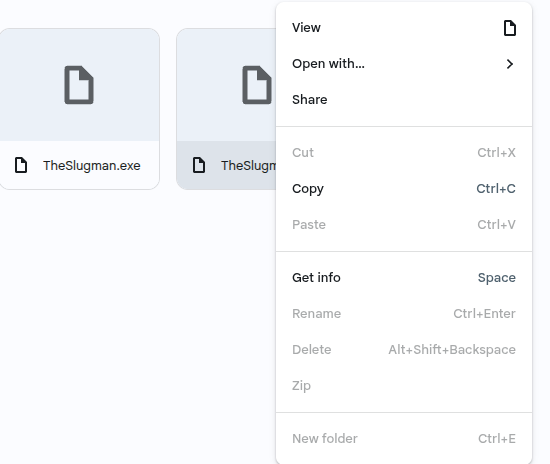
Hey there! This is an official message from the team member of the game!
Quick question, are you trying to open the game using Google Drive right?
Because if you are then consider it won't be able to work.
But from what I know is that I'm guessing you are having problems on opening the game on either Window or Android.
For Window, make sure you download the right Window files and open the file through the "File app" that already on your Window laptop or computer and NOT from the Google Drive as it wouldn't be able to get the game open.
For Android, make sure you download the right Android file and open the file through the "My file" app that already on your Android devices and NOT from Google Drive as that wouldn't be able to get the game open as well.
Hope this help you out!
Can you tell me which game file are you trying to open?
Is it Window, Android, Linux, or Mac file?
Because as far as I only know is that when I download the Window and Android files, the way I open the game files was very different from the way you are doing.
But after I took another look at the screenshot you provided, my guess is that it likely you are using ChromeOS in order to open the Window files as that is what I think you are doing wrong there.
Since you cannot open the Window files using ChromeOS as the file itself doesn't support that OS.
If Window file is what you trying to open then once again, the way you open the Window file is not suppose to look like the way that you are doing in the screenshot you shown me.
To demonstrate, I have try to download the Window file of the game using my Window laptop as this is the file that I downloaded.
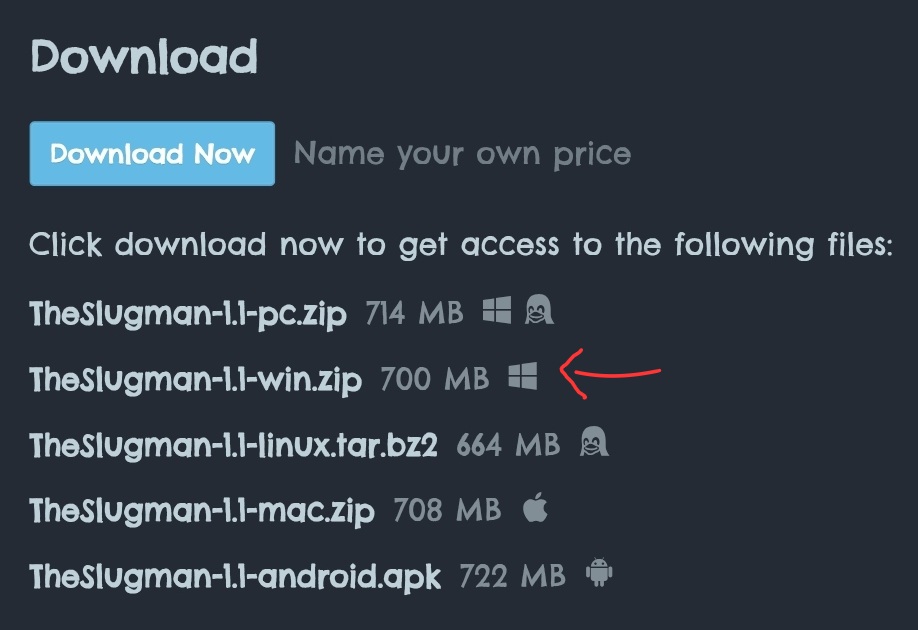
Another thing I also wanted to point out is that make sure you open the Window file using "File Explorer" that already on your Window laptop and NOT using the file on website like ChromeOS.
For optional, if the Window files is not working then you can try other files to see if it work! (depend on if you do own Android, Linux, or Mac)