
Indie game storeFree gamesFun gamesHorror games
Game developmentAssetsComics
SalesBundles
Jobs
TagsGame Engines

I was wondering if you might add any sort of explanation/tutorial for the mini games?  

They aren't impossible to manage, but it's a little unclear about the exact mechanics.  Like with the supermarket, I'm not even sure what like 75% of the items I'm clicking on are.  Rocks?  Green rocks?  An olive?
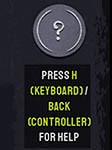
There is a question mark icon you can click during gameplay for hints. It has its own button in each minigame, and there are tooltips showing how to access it on a keyboard or controller.

Regarding the supermarket, I assume you mean the trash sweeping minigame where you have to clear trash and it's hard to tell what to avoid? There is a green outline around the items you shouldn't click. Please let me know if that green outline is difficult to see. If it is an accessibility issue, I can look into changing the overlay sprite to make it clearer.

(+1)

Thanks for the reply.  I'm on android, so that might just be my issue.  I'll try to check the tool tips.


In the trash sweep, I think I started to get the hang of it.  I just wasn't sure which items were trash at first, because it was hard to tell what the little images were, but once I started to notice the green outline for "good" items, it got easier