Indie game storeFree gamesFun gamesHorror games
Game developmentAssetsComics
SalesBundles
Jobs
TagsGame Engines

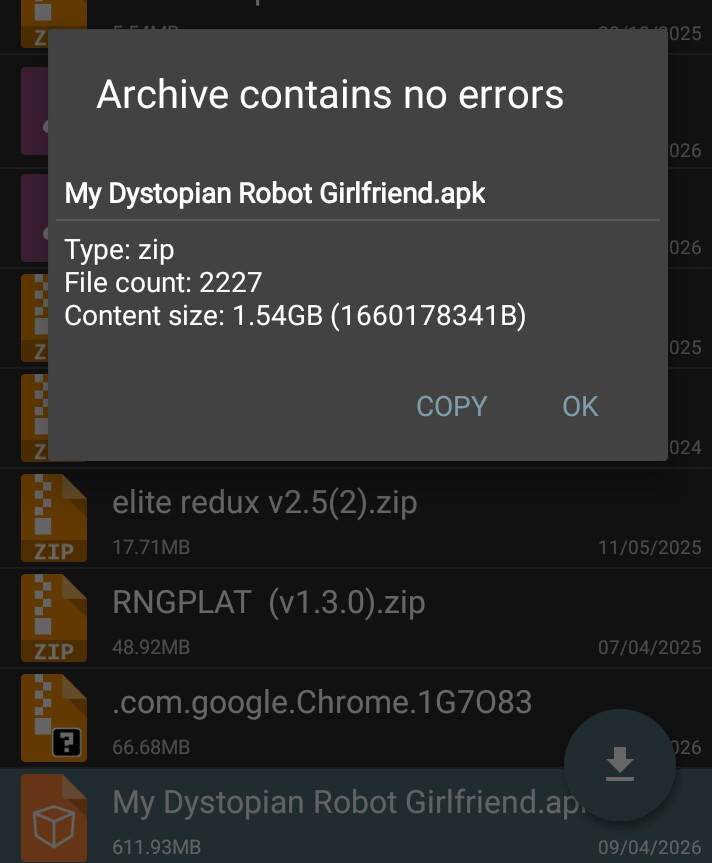
Can download but can't install. And why does it call its type zip in the image?

A topic by Pipboy1 created 3 days ago Views: 99 Replies: 5
Viewing posts 1 to 2
(1 edit)

I already deleted the game and tried to download the new version. Testing it with zarchive gives a type: zip. Is that supposed to be called zip even when being .apk? Maybe my worst nightmares have come true and will continue to haunt me until I get a pc or smth.

(1 edit)

👉🏻 APK = basically a ZIP file internally
So the app showing “Type: zip” is completely normal.

What you’re seeing is completely normal.

An .apk file is actually a type of .zip file internally, so tools like ZArchiver will display it as “Type: zip”.

This does not mean anything is wrong with your file.

⚠️ Important:

You should NOT extract the .apk file.

Instead:

  • Install it directly using your file manager or package installer
  • Make sure you allow installation from unknown sources

💡 If you cannot install it:

The issue is usually not related to the file type.
It may be caused by:

  • Your Android version not being compatible
  • Storage or permission issues
  • A corrupted or incomplete download

So in short:

👉🏻 Seeing “zip” is normal
👉🏻 Do not extract it
👉🏻 Install the .apk directly

What's the minimum version requirement for Android?

There is no minimum version.
You can download the game, and it will always be the latest released version.

I ment what version of android to play the game's newest version.

There isn’t an officially stated minimum Android version from the developer, but based on user reports and testing:

  • Newer versions of the game generally require Android 5 or higher
  • For the best stability and compatibility, Android 10 or higher is recommended

⚠️ Important:

If your Android version is too old:

  • The game may fail to install
  • Or it may install but crash / not launch properly

📝 Additional notes:

  • The APK showing as “zip” is completely normal (as explained earlier)
  • If installation fails, it’s more likely due to:
    • Android version compatibility
    • Device limitations (RAM, CPU)
    • Permission or installer issues