
Indie game storeFree gamesFun gamesHorror games
Game developmentAssetsComics
SalesBundles
Jobs
TagsGame Engines
(+1)

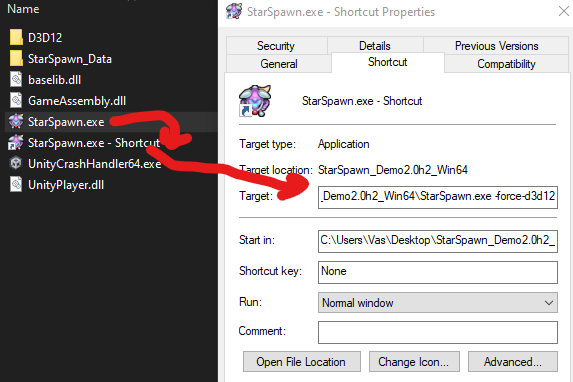
Create a shortcut to the executable and add it to the end of the target input. 

Right click the executable to create the shortcut then you can right click the shortcut to get its properties.

If there are any spaces in your path, you will need to wrap your "Target" in quotes like I did with the word there, if it isn't already quoted.

I'm sorry, perhaps because my system is Windows 11, when I tried to follow your steps, it displayed the message "The name specified in the 'Target' box 'F:\H Game\StarSpawn_PublicDemo-2.0h2-Win64\StarSpawn_Demo2.0h2_Win64\StarSpawn.exe -force-d3d12' is invalid. Please make sure the path and filename are correct."

That doesn't make sense, Windows 11 should be pretty close to the same as Windows 10. I doubt they changed that particular interface any. Is that a space after the H? Why would it be in the base folder on the F drive? Anyway, if there's a space, you need to surround the target only in quotes, and then add the -force line after the quotes.

"F:/Game Path/Game.exe" -force-d3d12

If no space, quotes are not needed.

Oh, it works now. I just need to put -force-d3d12 to the right of "".Thank you!