


Create, delete and use Smart Playlists in AJ Audio
You can create a Smart Playlist that automatically organises songs and other media into playlists based on criteria you specify. Whenever you start AJ Audio, the Smart Playlist is automatically updated.
For example, you could create a Smart Playlist that includes your favourite artist and album, but only if songs within this album are disliked.
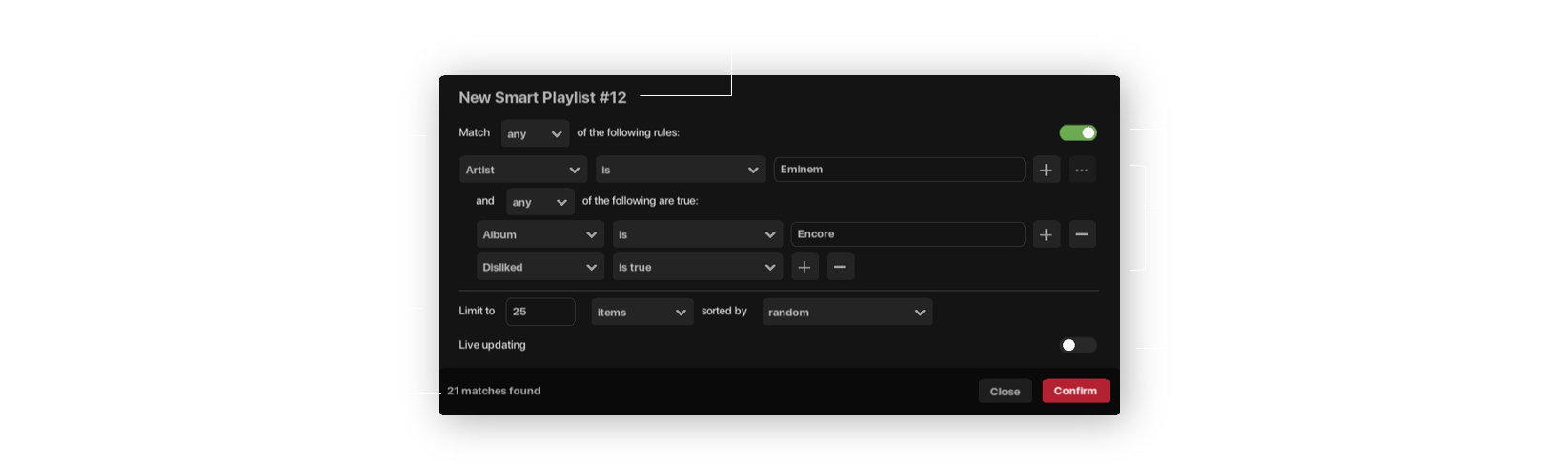
- Smart Playlists are automatically synchronised to your Jellyfin server.
To create a Smart Playlist
- Click the Create (+) button in your Library > New Smart Playlist
- Add or remove filters as appropriate
- Click confirm to update your Playlist
To delete a Smart Playlist
- Right click the Smart Playlist > Delete
Available conditions
The following conditions can be used:
- Album
- Artist
- Artist count
- Available offline
- Bit depth
- Bitrate
- Date added
- Disc number*
- Disliked
- Explicit
- Favourite
- Format
- Genre
- Has lyrics*
- Last played
- Name
- Path
- Play count
- Rating
- Sample rate
- Size
- Time
- Track number
- Year
* = only applicable for Jellyfin items
Available limits
Smart Playlists can be limited by items, minutes, hours, MB, or GB worth of music, sorted by:
- Random
- Album
- Artist
- Genre
- Title
- Most recently played
- Least recently played
- Most often played
- Least often played
- Most recently added
- Least recently added
There is an absolute limit of 999 tracks per Smart Playlist.