On Sale: GamesAssetsToolsTabletopComics
Indie game storeFree gamesFun gamesHorror games
Game developmentAssetsComics
SalesBundles
Jobs
TagsGame Engines

PC's OS - Windows 11
CPU - AMD Ryzen 5 4600G with Radeon Graphics
RAM - 32 GB
Storage - 434 GB left on my disk drive
GPU - AMD Radeon RX 580 2048SP

๐‘ฐ ๐’–๐’”๐’†๐’… ๐’Š๐’•๐’„๐’‰.๐’Š๐’'๐’” ๐’…๐’†๐’”๐’Œ๐’•๐’๐’‘ ๐’‚๐’‘๐’‘ ๐’‡๐’Š๐’“๐’”๐’• ๐’ƒ๐’†๐’‡๐’๐’“๐’† ๐‘ฐ ๐’–๐’”๐’†๐’… ๐’•๐’‰๐’† ๐’˜๐’†๐’ƒ ๐’…๐’๐’˜๐’๐’๐’๐’‚๐’… ๐’‚๐’๐’… ๐’–๐’”๐’†๐’… ๐‘พ๐’Š๐’๐‘น๐‘จ๐‘น ๐’˜๐’Š๐’•๐’‰ ๐’Š๐’•. ๐‘ต๐’๐’˜ ๐‘ฐ ๐’‚๐’๐’”๐’ ๐’…๐’Š๐’… ๐’๐’๐’๐’Œ ๐’•๐’‰๐’“๐’๐’–๐’ˆ๐’‰ ๐’•๐’‰๐’† ๐‘ด๐‘จ๐‘ช ๐’—๐’†๐’“๐’”๐’Š๐’๐’ ๐’๐’‡ ๐’Š๐’• ๐’‚๐’๐’… ๐’•๐’‰๐’† ๐’”๐’‚๐’Ž๐’† ๐’•๐’‰๐’Š๐’๐’ˆ ๐’˜๐’Š๐’•๐’‰ ๐’•๐’‰๐’† ๐’Ž๐’Š๐’”๐’”๐’Š๐’๐’ˆ ๐’‡๐’Š๐’๐’†๐’”! ๐‘ต๐’๐’˜ ๐’Š๐’‡ ๐‘ฐ ๐’๐’†๐’†๐’… ๐’‚๐’๐’๐’•๐’‰๐’†๐’“ ๐’…๐’†๐’—๐’Š๐’„๐’† ๐‘ฐ ๐’„๐’๐’–๐’๐’… ๐’‚๐’๐’˜๐’‚๐’š๐’” ๐’–๐’”๐’† ๐’‚ ๐’—๐’Š๐’“๐’•๐’–๐’‚๐’ ๐’Ž๐’‚๐’„๐’‰๐’Š๐’๐’†?

Huh, that's strange... Downloaded myself and all seems well-

This might be a 'your PC' issue, Truly haven't seen any of my play testers run into this-  I've had issues before where RPG Maker deployment file didn't come with the game, which isn't too hard of a fix, just replace the images, this didn't occur-

I can send a build out that doesn't take out the unused RPG Maker assests out and that might work, but it'd make the file much bigger- Aplogies for my lack of help, I just haven't ran into something like this :O

(1 edit) (+1)

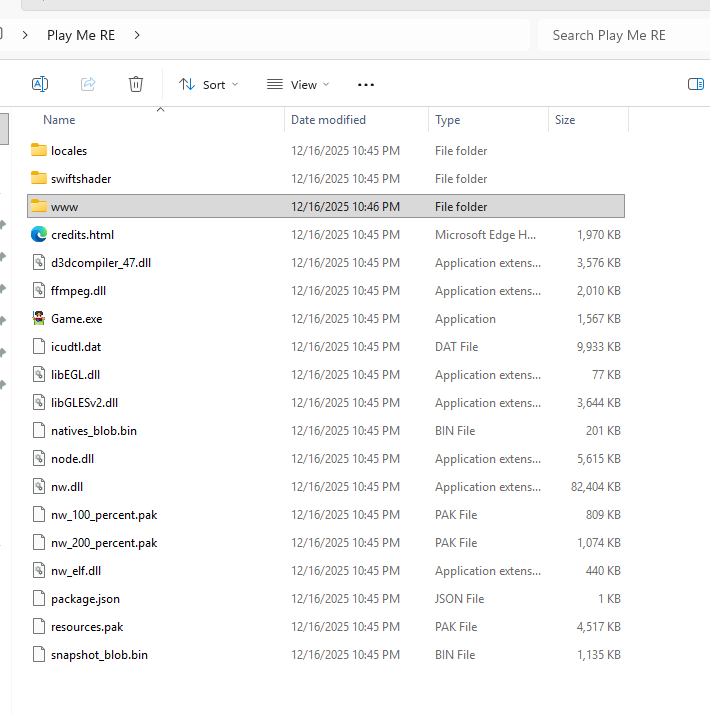
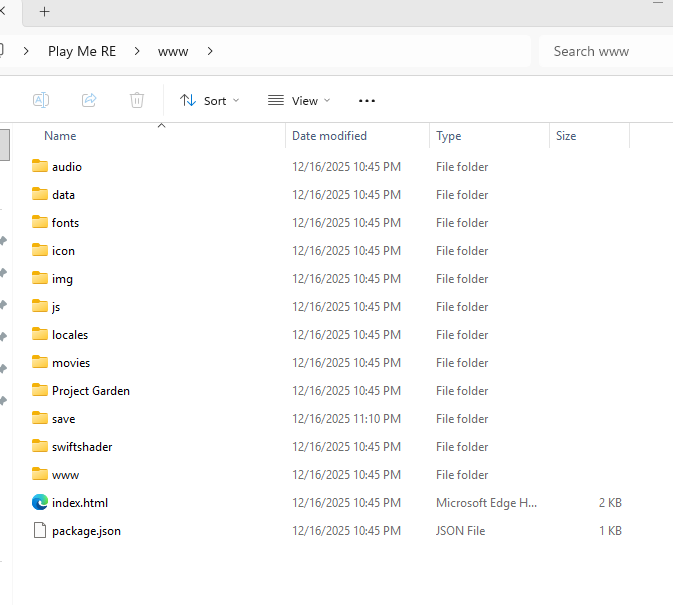
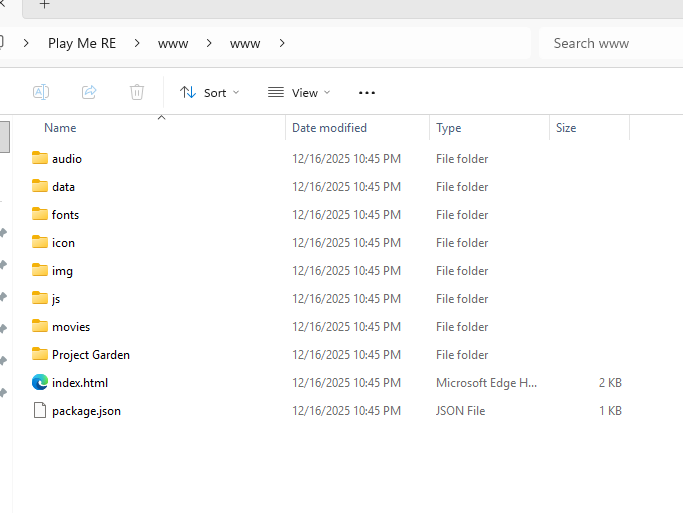
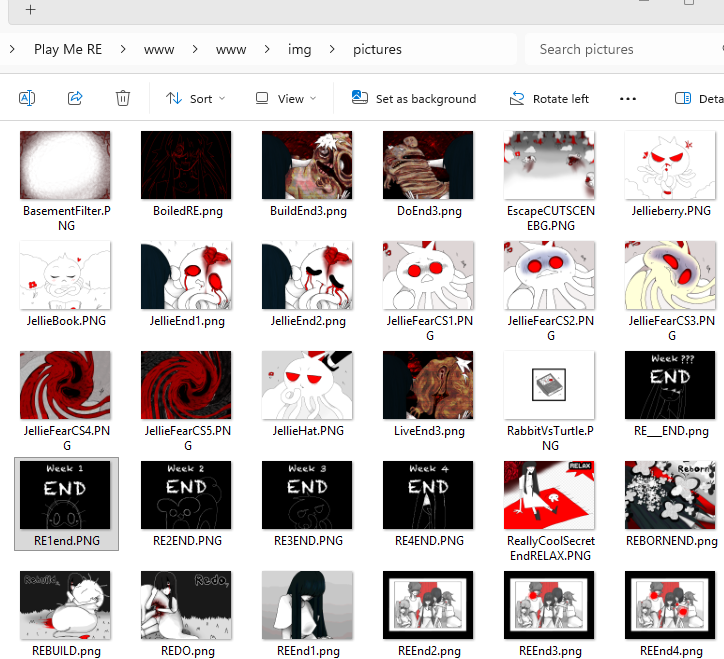
Hey, different user here: I ran into the same issue after doing the first day and going to sleep (same error and everything), but I initially thought that it may be because of the file extensions, not because the pictures are actually missing as for some reason, certain pictures are .PNG instead of .png... then I realized that I DID see some of these ".PNGs" ingame so that was wrong. However, I think, for some reason, the actual issue is that there's TWO "www" files (with the second www file having seemingly a completed copy of the game's files + the missing images?), and the "first one" is the one the game actually uses, but is missing files?

Like, this doesn't feel like a "backup www file" to me, it's too weirdly structured and the 2nd www file is missing the "locales".

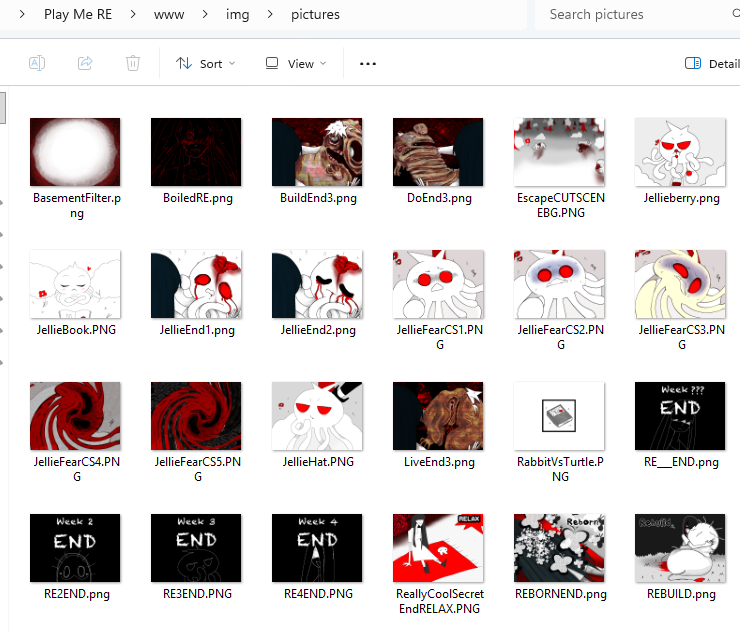
First image has the 1st file, second image is when I click on said www file, 3rd image is when I click on the 2nd www file. (4th and 5th images show the differences between the www files, including differences in the "Jellieberry.png" image, strangely the 2nd www has a "rough draft" version?) The game is clearly working with ONLY the "first www files" because there's a "save" folder there, with my save data, yet the "first files" don't have the images that the game wants, while the "second www" does.

I'm going to run an experiment by redownloading the game to restore everything back to default, and see what happens if I try to replace the first www file before even opening the game, with the second www file, taking care to save the "best quality" images and stuff. That may fix most issues that Gifeye encountered, as it almost seems like the "first www" is a newer version that was somehow "merged" with the older version, resulting in odd issues like files being missing, etc.

If possible, could you download the zip that this site links and see if there's a "second, actually complete www" in the files?


Oh dang- I reuploaded the PC build to have that removed, so that might fix the big issues :D I hope.

Hey, semi-technology lover here. I have the same issue with the missing images. Can you check my reply to OffBrand, it may explain the cause of these issues if you repeat my steps and check your files and discover the same anomalies as me.