

Hi, how does the Create Skybox event work? Can a texture be applied or is it a solid color?

Make 3D games in Construct 2 powered by Babylon.js · By
Skyboxes are a bit specific.
It is expected that you have 6 square skybox textures imported for each side of the cube.
They need to match the naming convention "skyboxname_suffix.jpg".
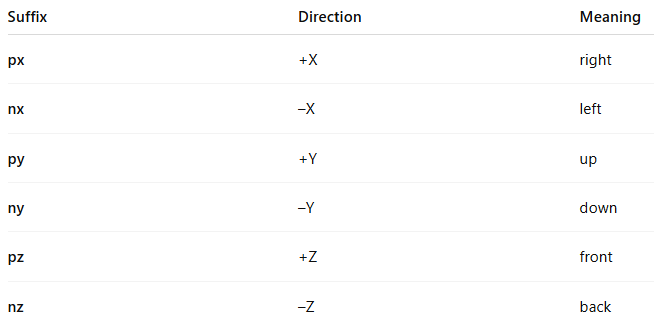
So if you created a skybox via action and named it "cloudy" you would need to import the following files into your project:
cloudy_px.jpg, cloudy_nx.jpg, cloudy_py.jpg...
And yes currently it does have to be a jpg file (NOT ANYMORE IT'S PNG BY NOW). With the next update skyboxes will work with png files.
In case you're interested further here's the relevant Babylon.js documentation: https://doc.babylonjs.com/features/featuresDeepDive/environment/skybox