
On Sale: GamesAssetsToolsTabletopComics
Indie game storeFree gamesFun gamesHorror games
Game developmentAssetsComics
SalesBundles
Jobs
TagsGame Engines

Have you done this?
If you have a previous save you will need to delete CompanionData.txt from 'C:\Users\USERNAME\AppData\LocalLow\LAGS\RingManSpiritHunt'. Keeping previous version of this file will result in no character movement.

(+2)

and if you cant find that folder here's another guide 

make sure to click View and check the "Hidden Items"

C:\Users\yourusername\AppData\LocalLow\LAGS 1. Open "RingManSpiritHunt" folder
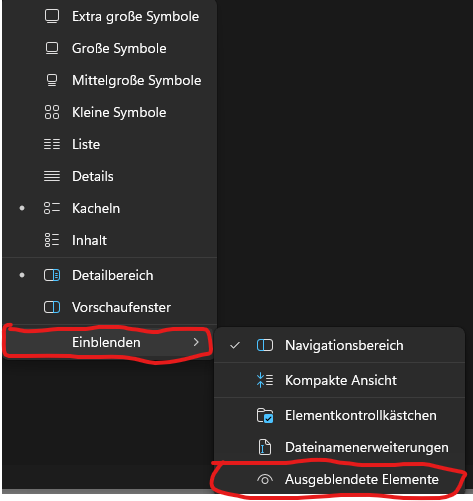
i know i sound stupid but is that on windows or on linux, after months of going through my pc i still cant find it, i even deleted the whole folder where i had the game stored it, still didnt fixed anything on my behalf XD i also have my pc on german

Oh my god i just found it im so stupid geez

same had happened with me >.< . GOOD LUCK.

can you guide me in more detail? i cant find that folder

bro si siges teniendo el problema este video te puede ayudar o es mas probable que lo hayas ya resuelto xd pero bueno :v

Its simple just open your explorer, klick on Display and then on the other Two ill show you, Then use the data path as given in previous posts It will guid you direktly. Hope you can find it :)