On Sale: GamesAssetsToolsTabletopComics
Indie game storeFree gamesFun gamesHorror games
Game developmentAssetsComics
SalesBundles
Jobs
TagsGame Engines
Deleted post
(1 edit)

Sorry for the late answer, life if a bit busy at the moment.

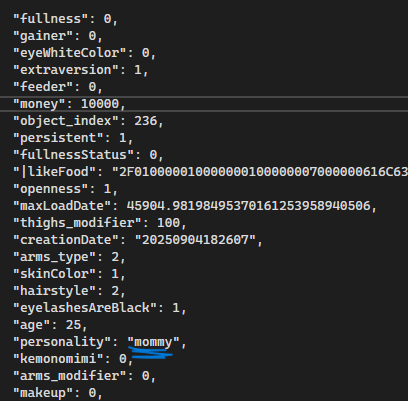
But yeah, personalities technically work ; I don't consider it functional because there isn't a way to select them in-game and there are currently no easy way to assign custom dialogues to the different personalities.  But if you're willing to fiddle with the game files to create your own personality, here's a short rundown of how things currently work:

  1. As you noticed, changing the name of your character's personality in the game file will change her personality in-game. Personalities are basically a keyword to let the game know which dialogues and emotes to use. If the personality is not found, it will default to "cheerful".
  2. Dialogues are split by room. You can find the dialogue files by navigating to the gamedata\Dialogs  folder. In each of the folders there, you will find a "cheerful" folder. You can copy-paste it and rename it to any other personality you want ; it should allow the game to fetch dialogue lines specific to this personality instead of the default "cheerful" folder. I would not advise messing with the events as, from experience, it is very, very easy to mess up everything if you don't have some UI to organize everything for you, but editing the "lines" item in the dialogue files is completely fine and should not break anything.
  3. Reactions and emotes are located in the gamedata\Personalities\Personalities.json file. You can edit the file by hand, but I would recommend using the Customization Tools as this part should be fully functional. Just in case you want to modify it by hand, the file is basically a list of objects. Emotes are defined by the "emotions" item, which is a list of all the emotes that can be used and their parameters.
Deleted post