
On Sale: GamesAssetsToolsTabletopComics
Indie game storeFree gamesFun gamesHorror games
Game developmentAssetsComics
SalesBundles
Jobs
TagsGame Engines
(+1)

Controls felt good. Fun little game. Great seeing so many Godot entries in this jam! Glad you put in controller support, even though you didn't document it.

I'd recommend setting MOUSE_MODE_CAPTURED so it's easier to look around while playing. Also adding the ability to look with the right-stick would be nice. Also would have been helpful if the cubes glowed a different color from the enemies. I couldn't find two of them and them fell off a platform and gave up.

Nice entry!
(+1)

Interesting. I had a version of the game with controller support but I went with keyboard and mouse(or so I thought) because I was having issues with capturing the right input. It looks like the character controls still work on the gamepad though not the camera orbit with the right stick. Thanks for pointing this out. I will fix it in the post jam version.

(+1)

Yeah, it's a little different doing look with gamepad vs mouse. When you're doing the mouse, you get the difference every frame, so you have to zero it out. With a gamepad joystick, you have to not zero it out, so you can get it to work. I can link you a code example if you're interested.

I am interested. Thanks!

(+1)

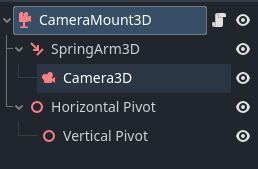
Here's the repo I use to track mouse and controller input. https://github.com/dragonforge-dev/dragonforge-controller Check out the Mouse.gd and Gamepad.gd scripts. They both update Controller.look. Then in my camera mount (which you could just use this with a SpringArm3D, Camera3D and the two Pivot nodes (which are just Node3D and are separate from the SpringArm and Camera to avoid Gimbal Lock.)


class_name CameraMount3D extends Node3D   
const HEAD_VISIBILITY_LAYER = 2  
## How far up the camera will rotate in degrees. 
@export var upwards_rotation_limit: float = 0.0 
## How far down the camera will rotate in degrees. 
@export var downwards_rotation_limit: float = 0.0 
## If true, camera is a first-person camera. Otherwise, third-person.
 @export var first_person: bool = false   
@onready var spring_arm_3d: SpringArm3D = $SpringArm3D 
@onready var camera_3d: Camera3D = $SpringArm3D/Camera3D 
@onready var horizontal_pivot: Node3D = $"Horizontal Pivot" 
@onready var vertical_pivot: Node3D = $"Horizontal Pivot/Vertical Pivot"   
   func _ready() -> void:
     if first_person:
         spring_arm_3d.spring_length = 0.0
         spring_arm_3d.rotation.x = 0.0
         camera_3d.set_cull_mask_value(HEAD_VISIBILITY_LAYER, false) #Turning off the layer the head model is on.
   func _physics_process(delta: float) -> void:
     update_rotation()
   func make_current() -> void:
     reset_rotation()
     camera_3d.make_current()
   func update_rotation() -> void:
     horizontal_pivot.rotate_y(Controller.look.x)
     vertical_pivot.rotate_x(Controller.look.y)
     vertical_pivot.rotation.x = clampf(vertical_pivot.rotation.x,
         deg_to_rad(upwards_rotation_limit),
         deg_to_rad(downwards_rotation_limit)
     )
     apply_rotation()
     if Controller.get_last_input_type() == Controller.LastInput.KEYBOARD_AND_MOUSE:
         Controller.look = Vector2.ZERO
   func apply_rotation() -> void:
     spring_arm_3d.rotation.y = horizontal_pivot.rotation.y
     camera_3d.rotation.x = vertical_pivot.rotation.x
   func reset_rotation() -> void:
     horizontal_pivot.rotation.y = 0.0
     vertical_pivot.rotation.x = 0.0
     apply_rotation()
(+1)

Sorry the code quality is crap. Feel free to post questions on the Godot forums and tag me (@dragonforge-dev).

Thanks for this!