
Indie game storeFree gamesFun gamesHorror games
Game developmentAssetsComics
SalesBundles
Jobs
TagsGame Engines
(1 edit) (+1)

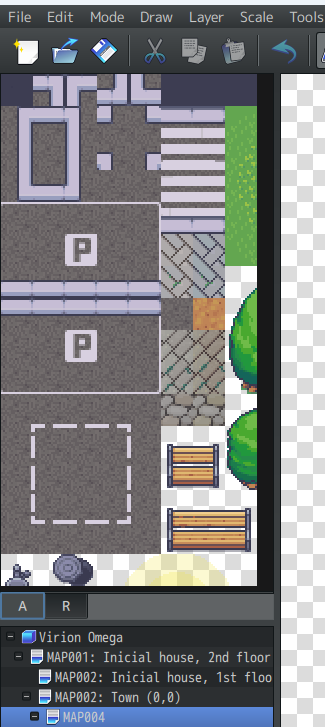
Hey good morning, i found a problem, i copied the "Modern_Exteriors_Complete_Tileset_48x48.png" and pasted it inside my RPG MZ tilesets folder to use it, inside the program i went to Database -> Tilesets and created a new one containing the png in one of the 9 empty slots, but when i tried to use the tilesets i noticed that the map editor only lets me use a tiny part of the png (only lets me use what is in the image im showing). Im a complete novice at using RPG so i don´t get if this happens because the program only accepts a certain ammount of tilesets, after all the Modern exteriors png contains all the tilesets (that are a lot) in just 1 png, and if i want to add the tilesets separately i find that all the tilesets (5.660 elements ) are separated 1 by 1 by searching the tileset folder"singles" but RPG MZ tileset database only accepts 9. i searched around and didn´t find any "Modern_Exteriors_A1", "A2" and the like to insert each to their corresponding slots.

I also tried downloading the Modern Exteriors RPG MV but its tilesets are also separated in a total of 120 groups, im lost.
(1 edit) (+1)

Solution  

1. Manually Split the Large Image 

   - Use image editing tools (e.g., Photoshop, GIMP) to crop the large image according to MZ's specifications:  

     - A1-A4: Each file should be `288x384 pixels` (48x48 tiles × 6 columns × 8 rows).  

     - B-E: Each file should be `768x768 pixels` (48x48 tiles × 16 columns × 16 rows).  

   - Categorize tiles by function (e.g., doors and windows go in A2, floors in B).  

2. Utilize the "Singles" Folder (Individual Tiles)  

   - If the asset pack provides individual tiles (e.g., 5,660 separate files), you need to:  

1. Batch Combine: Use tools like [Tiled](https://www.mapeditor.org/) or online tile stitching tools to merge small tiles into properly formatted sheets.  

     2. Group by Function: For example, combine all wall tiles into `B.png` and furniture tiles into `C.png`.  

Let me know if you'd like further details on any step!

Yo bro tysm for helping me! Im currently trying your 2nd solution, imma reply to you if i crash into problems, need details or if i finish.

(+1)

Hi, you can just copy paste your question to chatgpt and you'll get your answers ;)

I had the same problem, did you manage to solve it?

Nah, tried using the Tiles thing the guy told me to, but i dont understand nothin at all