

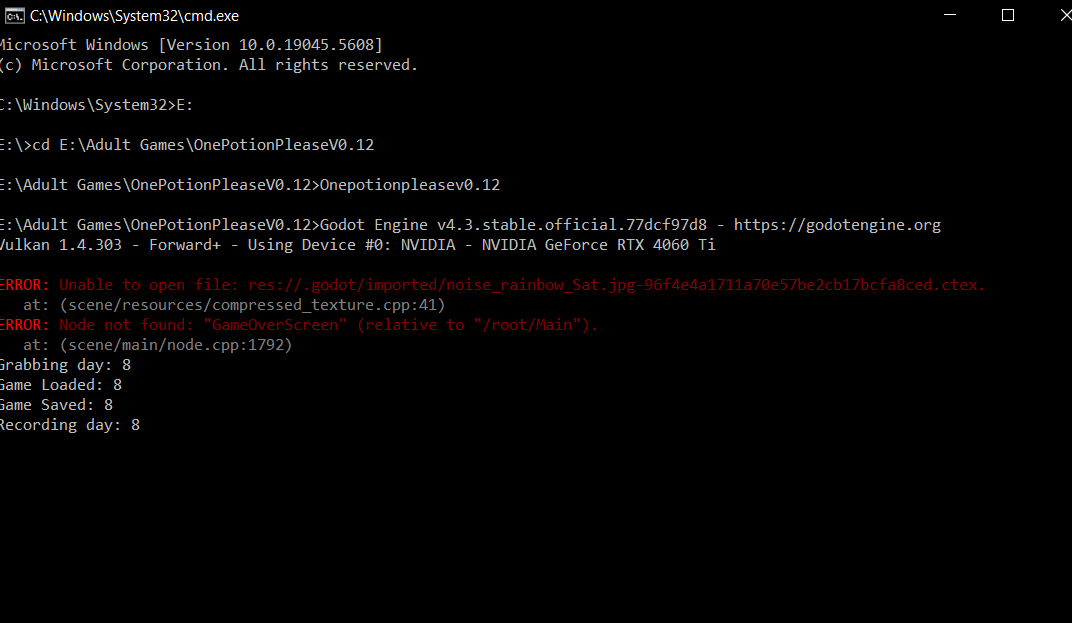
 Your best option is to run the game from the CMD window and see if Godot spits out any errors.
To tun the game in the Command Window, first load CMD by Windows Key + R then in that window type in CMD.
Once the window is open type in the drive letter where the game is at if its on any other drive than C:. So if your game is on your D: drive type in D: then press enter, this changes the active drive.
Copy the folder path the game is installed to with Control + C from the file explore title bar. Then go back to the CMD window and type in cd followed by a space then use control + v to past the file path then press enter. Then type in the name of the exe to run and press enter.
In my case it looks like this.
CD E:\Adult Games\OnePotionPleaseV0.12
Once you do that the game window will open and Godot will display any errors in the CMD window.