

hi!! I really really love this game! is there a way for me to change the player's body aside from at the start? I selected the feminine body, female genitalia, but after I told Rylan I was a boy, wanting my character to be a feminine trans man like myself, it automatically forced me into the male body type from thereon out. can I fix this?
Hey. There is a clinic on the second floor of Akra. It will take a while for you to unlock this area of the map.
Edit: I just tested this combination of body and pronoun that you mentioned and the scene with Rylan had no problems with me, he said the pronoun correctly and in the sexual act it was described that I had the female body. Try starting the game again, I think you may have clicked on something wrong when choosing.
1 year ago (+1)
This really wasn't supposed to happen. Fixing this is quite complicated because in the game we still don't have the ability to change the pronoun or change the body from male to female, only the genitals.
To fix this you would have to use a online save editor and change two variables... If you want I can fix it for you, but you have to tell me what combination of body size, hair color and size, eye color and skin you want.
If you want to try to fix it yourself, here's how:
1. You don't need to start the game over, just save the game and exit the game immediately (it's important to exit immediately, because the game generates save files automatically and you will end up selecting the wrong file when editing).
2. Find your game's save folder. On PC, it's in Lust Odyssey/game/saves, and on Android, it's android/data/ (I don't remember the file name, it's either Lust Odyssey or xperiment.)
3. Go to this websiteand upload your save (sort it by date and time if you don't know which file it is).
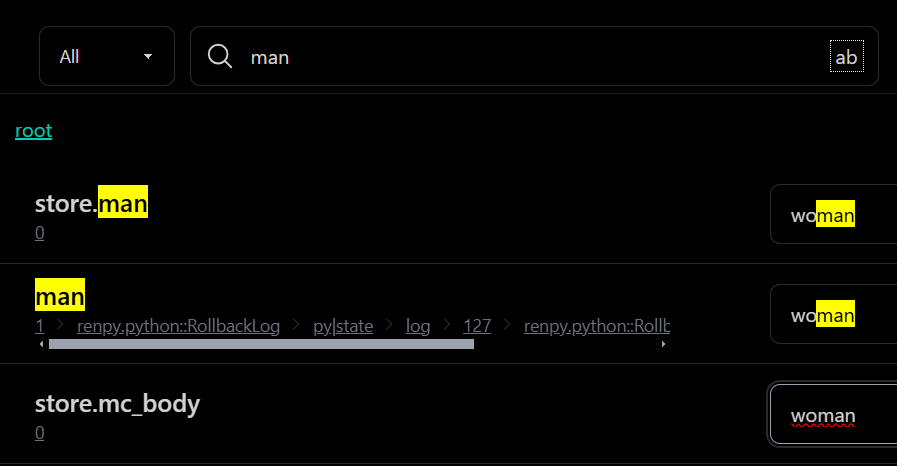
4. Search for 'man' in the magnifying glass, which is easier to find and change the values of the following variables:
store.man
store.mc_body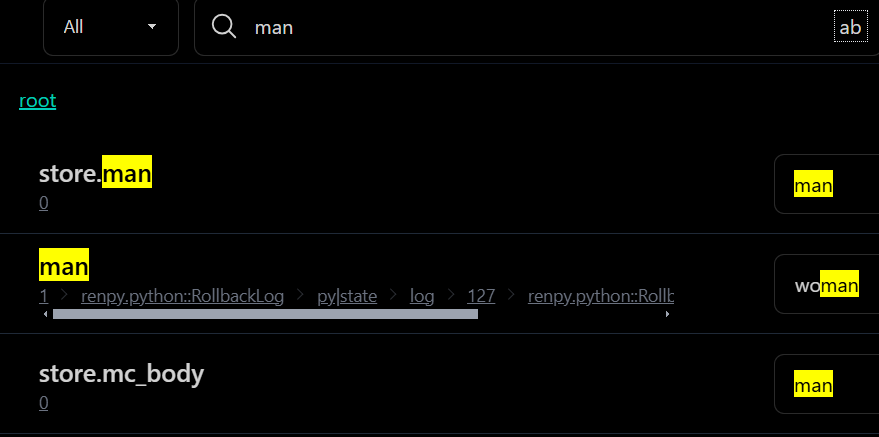
Change it the same way as in the image below, from man to woman.
5. Download the file, put it in your game's save folder, then open it and load your save.