

I just bought this, where are the dirt border tiles? i can not find it in the atlas.png. There are only single row or column dirt, but i want to make a square dirt field just like the demo screenshot on this page. And i am not using godot by the way.
Hi Gif! I just bought the premium version of this amazing pack. I saw your reply here from a while ago about adding the dirt border tiles to make a larger square field (instead of just the single row/column ones). Could you point me to which file they are located in the premium download, or did you forget about adding them? I've been looking through the files but couldn't seem to find the seamless square borders. Thanks a lot for the great work!
Are you looking for these tiles ? (I've just updated the package)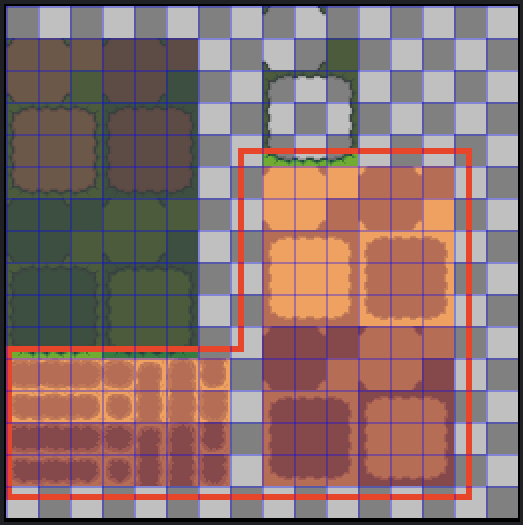
- location : assets/tiles/ground_01_16x16.png
Also, autotiles are available :
- engines\Godot\autotiles\2x2\06_field
- engines\Godot\autotiles\3x3\06_field
- engines\RPG_Maker_MV_MZ\autotiles\A2\_RANCH_AUTOTILE_A2_01.png
- engines\RPG_Maker_VX_VXace\autotiles\A2\_RANCH_AUTOTILE_A2_01.png
- engines\RPG_Maker_XP\tiles\_RANCH_TILE_ground_01.png
- engines\RPG_Maker_XP\autotiles\06_field