


Hi, I've been experiencing some weird issues involving the backgrounds of certain rooms.
The bug looks like this:
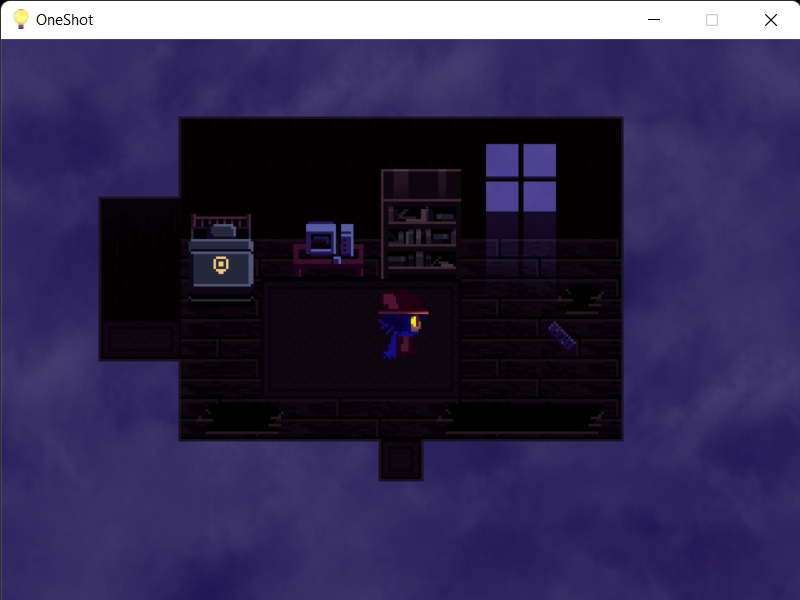
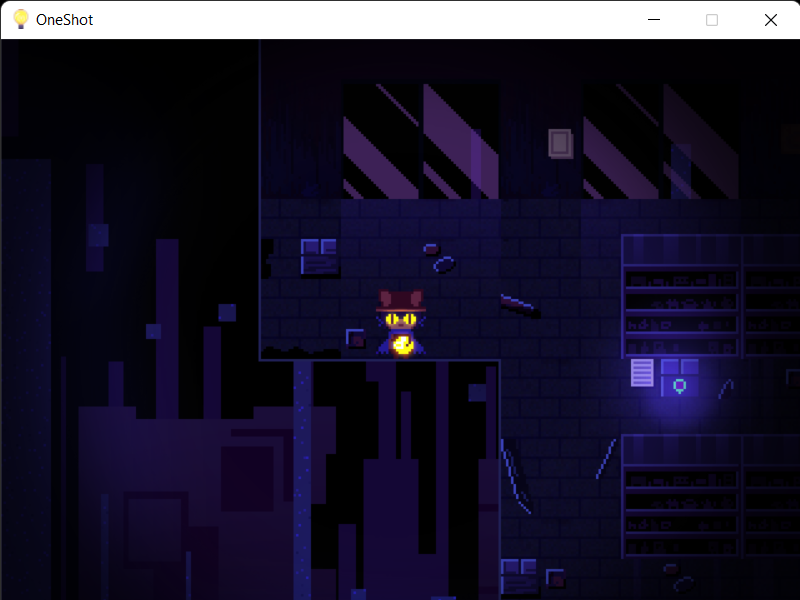
Basically, it seems the game is failing to load the black tiles past the walls. To my knowledge, this makes no sense, since I'm pretty sure that the black tiles used in these rooms are Autotiles, with the blue line bordering the room being part of the same tileset. This would mean that the game is failing to load PART of the tileset (I could be completely wrong, though, but it seems the black tiles here are part of the Autotiles). This literally makes zero sense, and yet, here it is. However, upon looking at the tilesets in the game files, nothing actually seems to be wrong. This may be a game wide bug where it fails to load the inside part of the Autotiles, and only the lines.
Again, this shouldn't be the case, but something, somehow, is causing these tiles to mess up.
This issue doesn't seem to be present on the 32 bit version of the game, as a friend of mine recently played through the game using that version and didn't encounter this bug (they had initially installed the 64 bit version of the game and experienced the same issue), however the 32 bit version of the game absolutely refuses to open for me, which is most likely a Windows 11 issue.
The most bizarre thing of all, though, is that when I first installed this game several months ago, I didn't experience this issue at all. It is only now that I am reinstalling the game that this is a problem.
I noticed that the game had received an update a little over a month ago, and I'm almost positive this update somehow caused this issue. Still, it doesn't make any sense, since none of the tilesets seemed to have been changed at all in this update, but I'm not the developer of this game, so I've got absolutely no idea.
Writing this because it doesn't seem to be an issue exclusive to me, it seems to be an issue with this updated version of the game itself, meaning everyone who installs the game now will most likely experience this issue (again, I had a friend encounter this as well).
I'm pretty sure OneShot was made using a modified version of RPG Maker XP, which is probably part of the problem, but I have no idea what this modified version is like, so I can't give any suggestions.
This doesn't make the game unplayable or anything, but it is a MASSIVE problem, and I seriously hope it gets resolved sometime soon.