
Indie game storeFree gamesFun gamesHorror games
Game developmentAssetsComics
SalesBundles
Jobs
TagsGame Engines

Hotscreen

Add very hot effects to your screen. · By PerfectFox265

Report your bug here Sticky

A topic by PerfectFox265 created May 09, 2025 Views: 9,359 Replies: 143
Viewing posts 61 to 69 of 69 · Previous page · First page

Hi, I love this software, however, it runs very poorly on my main (4k) monitor. Like 15 fps even with a rtx 5080. And the entire screen is locked to the framerate of Hotscreen. I've tried using it on my second monitor (1440p) but it detects the screen as 4480x2520 instead so the censors are misaligned.

Logs:

Hotscreen using profile : default

Hotscreen Overlay starting at Max FPS : 999

Translations added from ./CUSTOM_DATA/translations.csv — languages : ["en", "zh", "es", "fr", "ar", "ru", "pt", "ko", "ja", "de"]

Using saved language code : en

Windows version : Microsoft Windows NT 10.0.22621.0

CPU : 13th Gen Intel(R) Core(TM) i7-13700KF, Cores : 16, Threads : 24, Max clock : 3400 MHz

Using video adapter : NVIDIA GeForce RTX 5080 from NVIDIA type DiscreteGpu

Driver infos : d3d12 version 12_0 api 12_0

Adapter 0 NVIDIA GeForce RTX 5080

Screen Rect 0 : Rect { X = 0, Y = 0, Width = 3840, Height = 2160, Top = 0, Bottom = 2160, Left = 0, Right = 3840, Location = Point { X = 0, Y = 0 }, Size = Size { Width = 3840, Height = 2160 }, TopLeft = Point { X = 0, Y = 0 }, BottomRight = Point { X = 3840, Y = 2160 } } Orientation : 1

Screen Rect 1 : Rect { X = 6720, Y = 1097, Width = 4480, Height = 2520, Top = 1097, Bottom = 3617, Left = 6720, Right = 11200, Location = Point { X = 6720, Y = 1097 }, Size = Size { Width = 4480, Height = 2520 }, TopLeft = Point { X = 6720, Y = 1097 }, BottomRight = Point { X = 11200, Y = 3617 } } Orientation : 1

Adapter 1 NVIDIA GeForce RTX 5080

Adapter 2 Microsoft Basic Render Driver

Starting Screen Recorder

Initializing Windows10Capture using Video card 0 and monitor 0

Hotscreen version : Windows - Full version - v0.8

Max FPS of Overlay set to 999

Frame Latency of screen set to 1

Windows10Capture initiated on : 3840x2160

Max FPS Record start at 999

MaxFPSRecord at 999

Avx is supported.

Detection starting using model : ./models/hs-real-anime-y11n-640-fp16.onnx

Detection starting using eye model : ./models/eyes-detection-01.onnx

Detection starting using device : 0

Max FPS Detection start at 999

Use double Detection start at True

Update time of eyes detection start at 0,1

Setting MaxFPSDetection at 999

Setting detectOnlyArea at 0.36328125;0.26620370149612;0.26692706346512;0.4375

Setting detectOnlyArea at 0.0;0.0;1.0;1.0

Setting useDoubleDetection at 0

Setting useDoubleDetection at 1

Max FPS of Overlay set to 1

Max FPS of Overlay set to 999

MaxFPSRecord at 999

Setting MaxFPSDetection at 999

MaxFPSRecord at 1

Max FPS of Overlay set to 999

MaxFPSRecord at 999

Setting MaxFPSDetection at 999

Setting MaxFPSDetection at 1

Setting usePreciseEyesDetection at 1

Max FPS of Overlay set to 999

MaxFPSRecord at 999

Setting MaxFPSDetection at 999

Setting usePreciseEyesDetection at 0

Pausing screen recording

Recording is too slow. Stopping screen latency.

Max FPS of Overlay set to 1

Max FPS of Overlay set to 999

MaxFPSRecord at 999

Initializing Windows10Capture using Video card 0 and monitor 1

Windows10Capture initiated on : 2560x1440

Resuming screen recording

Setting MaxFPSDetection at 999

Initializing Windows10Capture using Video card 0 and monitor 0

Windows10Capture initiated on : 3840x2160

Initializing Windows10Capture using Video card 0 and monitor 1

Windows10Capture initiated on : 2560x1440

Setting detectionDevice at 1

Setting useDoubleDetection at 0

Setting useDoubleDetection at 1

Setting modelName at ./models/hs-real-anime-y11n-640-fp32.onnx

Setting modelName at ./models/hs-real-anime-y11n-640-fp16.onnx
Developer

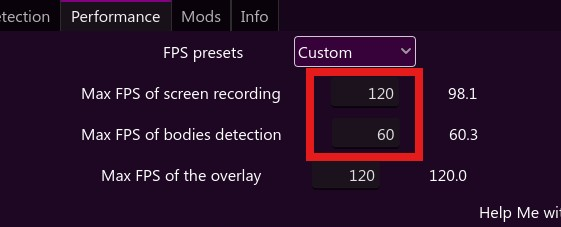
Try to limit the frame rate of screen capture and detection like this :

Your 1440p screen probably has a display scaling of 175%, I will look at that for the next update.

I have tried changing the values as shown in your screenshot. It didn't make a difference.

If by display scaling you mean the one in windows settings, then my 1440p screen is at 100%, but my 4k screen is indeed at 175%.

(1 edit)

<font style="vertical-align: inherit;" dir="auto"><font style="vertical-align: inherit;" dir="auto">您好!我一直很期待能正常使用这款软件。但很遗憾,我的软件打开后大约十秒钟就会崩溃,即使我什么都不做(我使用的是付费版本)。以下是我的日志:</font></font>

使用默认配置文件的 Hotscreen

在 file_to_dict_params 期间无法打开文件 ./hotscreen.save。

热屏叠加层在最高帧率 60 时启动

从 ./CUSTOM_DATA/translations.csv 添加的翻译 — 语言:["en", "zh", "es", "fr", "ar", "ru", "pt", "ko", "ja", "de"]

将自动语言代码设置为zh

Windows 版本:Microsoft Windows NT 10.0.22000.0

CPU:Intel(R) Core(TM) i5-10210U CPU @ 1.60GHz,核心数:4,线程数:8,最高频率:2112 MHz

使用的视频适配器:Intel(R) UHD Graphics(来自 Intel 的独立显卡)

驱动程序信息:d3d12 版本 12_0 API 12_0

适配器 0 英特尔® 超高清显卡

屏幕矩形 0:矩形 { X = 0, Y = 0, 宽度 = 2560, 高度 = 1440, 上 = 0, 下 = 1440, 左 = 0, 右 = 2560, 位置 = 点 { X = 0, Y = 0 }, 大小 = 大小 { 宽度 = 2560, 高度 = 1440 }, 左上 = 点 { X = 0, Y = 0 }, 右下 = 点 { X = 2560, Y = 1440 } } 方向:1

适配器 1 Microsoft 基本渲染驱动程序

启动屏幕录制

正在使用显卡 0 和显示器 0 初始化 Windows10Capture

Windows10捕获启动于:2560x1440

Hotscreen 版本:Windows - 完整版 - v0.8

最高帧率记录从 60 开始

叠加层最大帧率设置为 60

屏幕帧延迟设置为 0

MaxFPSRecord 设置为 60

(+1)

It's not so much a bug, or maybe it is, but on the default model, it seems to struggle to identify side boob, boob in small pixels/thumbnails, and penetration/testicles. It might be worth adding a testicle specific detection class just to help  make sure that they are always censored, or so that it helps detect in penetration (vag, anl. or oral.)

Hey so my problem is the sound censor I don't seem to get any noise or sounds coming from the program all other censor features work just fine it is just the sound one is there anything I am doing wrong?

Not a bug but a suggestion, an option for a fade away or delay for hiding an effect. Would help for when detection isnt quite perfect, so if it stops detecting, it will way the delay value before uncensoring that region of the screen, unless a detection is nearby in which it will move to there. Not sure how feasible this would be. 

Developer

Have you tried the setting of filters: Stay detected during X ? I could add a "fade away" option to it.

(3 edits) (+1)

I'm not really sure how to explain this bug but when starting hotscreen sometimes the window becomes completely invisible.  It will show up in alt+tab and on the task bar but clicking on it does nothing and the same with alt-tab. Trying to use WIN+arrow keys doesn't bring it back. The overlay still functions and stays above most things but the main window can't be brought to focus . I'm not sure how to replicate it. Sometimes it just fixes itself when I launch it from a different monitor and other times I have to delete my .save file. I only came across this while repeatedly closing and relaunching the application because I was trying to make a powershell watcher to make it so the app relaunches if closed, if that gives you a lead. 

I also had the remember last used screen and prevent the overlay from being minimized settings toggled

This is a log from when the bug was happening. I closed it manually. 

Hotscreen using profile : default

Hotscreen Overlay starting at Max FPS : 30

Translations added from ./CUSTOM_DATA/translations.csv — languages : ["en", "zh", "es", "fr", "ar", "ru", "pt", "ko", "ja", "de"]

Using saved language code : en

Windows version : Microsoft Windows NT 10.0.19045.0

CPU : Intel(R) Core(TM) i9-9900K CPU @ 3.60GHz, Cores : 8, Threads : 16, Max clock : 3600 MHz

Using video adapter : NVIDIA GeForce RTX 2070 SUPER from NVIDIA type DiscreteGpu

Driver infos : d3d12 version 12_0 api 12_0

Adapter 0 NVIDIA GeForce RTX 2070 SUPER

Screen Rect 0 : Rect { X = 0, Y = 0, Width = 1920, Height = 1080, Top = 0, Bottom = 1080, Left = 0, Right = 1920, Location = Point { X = 0, Y = 0 }, Size = Size { Width = 1920, Height = 1080 }, TopLeft = Point { X = 0, Y = 0 }, BottomRight = Point { X = 1920, Y = 1080 } } Orientation : 1

Screen Rect 1 : Rect { X = 1920, Y = 96, Width = 1920, Height = 1080, Top = 96, Bottom = 1176, Left = 1920, Right = 3840, Location = Point { X = 1920, Y = 96 }, Size = Size { Width = 1920, Height = 1080 }, TopLeft = Point { X = 1920, Y = 96 }, BottomRight = Point { X = 3840, Y = 1176 } } Orientation : 1

Adapter 1 Microsoft Basic Render Driver

Starting Screen Recorder

Initializing DXGI using Video card 0 and monitor 1

DXGI initiated with a resolution of 1920 x 1080

Max FPS Record start at 10

Hotscreen version : Windows - Full version - v0.8

Max FPS of Overlay set to 30

Frame Latency of screen set to 0

Loading mod scene : ./CUSTOM_DATA/Built-in mods/level_up_increase_lock_timer.mod.tscn

Loading mod scene : ./CUSTOM_DATA/Built-in mods/select_fps_preset_when_locked.mod.tscn

MaxFPSRecord at 10

Avx is supported.

Detection starting using model : ./models/hs-real-y11n-320-fp16.onnx

Detection starting using eye model : ./models/eyes-detection-01.onnx

Detection starting using device : 0

Max FPS Detection start at 10

Use double Detection start at False

Update time of eyes detection start at 0.1

Setting MaxFPSDetection at 10

Closing...

Screen recorder thread ends correctly.

Developer(+1)

You are speaking about the menu window, if I'm correct ?
(This might be because you closed the app before the menu load, so it registered a size of 0x0 pixels for the menu in the save.)

I will fix this, thank you for the report !

I get extremely high latency spikes for some odd reason, it can get up to around 2000 no matter what settings I change. I have a 5070 & an amd 7700 so i have no idea what the issue could be

I noticed this issue but found a fix before reporting it, so I’m sharing this note in case others run into the same problem.

My setup consists of one 3840x2160p main monitor and two 1920x1080p side monitors. Due to the size difference, the main monitor is scaled to 175% while the side monitors remain at 100%. Hotscreen has worked perfectly with this configuration until this morning; following an NVIDIA driver and Windows update, the side monitors were suddenly detected at 3360x1890. I played around with setting the main monitor to 100% scale and restarting Hotscreen, which returned the side monitors to 1920x1080p.

To retain independent scaling for different monitors, use the following fix:

  1. Right-click hotscreen.exe
  2. Select Properties
  3. Go to the Compatibility tab
  4. Click "Change high DPI settings"
  5. Check "Override high DPI scaling behavior"
  6. Select "Application" from the dropdown menu
  7. Click OK, then Apply

After restarting Hotscreen, the dimensions returned to normal. I’m curious if this is a requirement for users with mixed-resolution setups or if it’s something that could be addressed in an app update. 

Either way, love Hotscreen, thanks devs!

Viewing posts 61 to 69 of 69 · Previous page · First page