Welcome to the first ever Pondscum Challenge!
Tired of watching game development tutorials? Got no idea where to start? Does coding give you palpitations? Want to make an actual game while learning?
Join the Pondscum Challenge!
For one week, you’ll work on a simple, playable game while learning how to code in Godot. We’ll supply assets that you are free to use, unless you want to make your own. All you need to do is sit down and build the game.
This challenge is aimed at people who are new to coding and game development. The goal is to provide a focused, manageable project that teaches new concepts in a logical order, with each challenge building on what we learned in the previous one.
At the end of each submission period, your games may be reviewed and showcased on https://www.twitch.tv/kukuletavt and later in an edited VOD on YouTube.
The only requirement is that your submission follows the Challenge instructions and is playable. How much extra polish, art, sound, animation, or additional features you add is up to you.
---
Challenge Goal
Create a simple timed clicking game in Godot.
An object of your choice appears somewhere on the screen. The player clicks it to gain points. After each successful click, the object moves to a new random position. When the timer runs out, the game ends and the player can restart.
The goal is not to make a polished commercial game. The goal is to build a small, complete gameplay loop.
---
Engine Requirement
This challenge is made for Godot.
Please make your submission in Godot 4.x. Godot 4.4 or newer is recommended, but any Godot 4 version is acceptable as long as the project runs and follows the challenge requirements.
---
Required Mechanics
Your submission must include:
1. A clickable object on screen.
2. A score counter.
3. The score increases when the object is clicked.
4. The object moves to a new random position after being clicked.
5. A countdown timer.
6. A game-over state when the timer reaches 0.
7. A restart button or restart input.
8. The object should not give points after the game is over.
Your game does not need custom art, sound, animation, music, menus, or fancy effects.
Placeholder graphics are allowed.
---
Required Godot Concepts
This challenge is meant to practice these concepts:
- Node2D
- Area2D
- CollisionShape2D
- Sprite2D
- Label
- Button
- Timer
- Signals
- Mouse input
- InputEventMouseButton
- Vector2
- randi_range()
- get_viewport_rect()
- Basic game state using variables
You do not need to use all of these in exactly the same way, but your project should demonstrate the core ideas.
The official Godot documentation does a great job of explaining these concepts, and since we will continue to use them in future Pondscum Challenge Jams, do your best to figure out how they work.
---
Suggested Scene Structure
You're allowed to structure your scene/s however you want, but a simple structure could look like this:
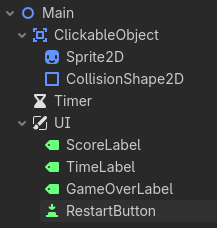
The clickable object should probably be an `Area2D`, since `Area2D` can detect mouse input when combined with a `CollisionShape2D`.
---
Optional Extra Features
If you finish early, feel free to add any of these features:
- Sound effects
- Music
- Animation
- High score
- Different target types
- Shrinking timer bonus
- Combo system
- Miss penalty
- Visual effects
- Custom theme
- More polished UI
Optional features are welcome, but the required mechanics must work first.
---
Asset Rules
You may use:
- the provided Pondscum Challenge assets
- your own original assets
- public domain assets
- Creative Commons assets
- assets you have permission to use
You may not use copyrighted or trademarked sprites, characters, music, sound effects, logos, or other assets unless you have the right to use them.
Do not submit games using assets from commercial games, anime, films, TV shows, brands, or other protected properties.
Examples of assets that are not allowed:
- Mario sprites
- Pokémon sprites
- Zelda music
- Sonic sound effects
- copyrighted anime characters
- commercial game UI assets
- logos from real companies or franchises
If you use assets made by someone else, credit them in your submission page or in a small `credits.txt` file.
Credit should include, when possible:
- creator name
- asset title
- source link
- license type
If you are unsure whether you are allowed to use an asset, use the provided assets or make a simple placeholder yourself.
---
AI Assistance
AI assistance is allowed, but you should understand the code you submit.
If you use AI to help with your project, mention it briefly in your submission. For example:
“Used AI for debugging help and explanations.”
The point of the challenge is to learn, not to submit code you cannot explain. Generative AI can be a useful tool to bounce ideas with, but keep in mind that they are unreliable sources. If everyone does their best to learn, then everyone's a winner!
This also means that we keep things civil and don't use this Jam to argue against each other.
---
Preferred Submission Format
Submissions will be handled here through itch.io.
The preferred submission format is:
1. A playable browser build on itch.io.
2. A downloadable build for Windows, macOS, or Linux.
3. A zipped Godot project folder.
4. A short gameplay video, only if you cannot get exporting to work in time.
A playable browser build is preferred because it lets people try your game without downloading anything.
If possible and you're comfortable with it, we'd love it if you include your Godot project files or source code as well. This makes it easier to review how you solved the challenge and to discuss useful learning points during the showcase.
---
Source Code / Project Files
Because this is a learning challenge, including your Godot project files is strongly encouraged.
You can do this by uploading a zipped version of your project folder alongside your playable build.
Before zipping your project, make sure it includes:
- project.godot
- your scenes folder
- your scripts folder
- your assets folder
- any required audio, font, or image files
Do not include unnecessary cache or temporary files if you know how to remove them, but do not worry too much about this for the first challenge.
If you do not want to share your full project files, you may still submit a playable build, but code review may not be possible.
---
What to Include on Your Submission Page
Please include:
- the name of your game
- a short description
- which version of Godot you used
- whether you used the provided assets, your own assets, or third-party assets
- credits for any third-party assets
- whether you used AI assistance
- anything you found difficult or learned while making the game
- any optional features you added
Example:
Game made in Godot 4.5.
Used the provided Pondscum Challenge assets.
Used AI for debugging help and explanations.
The hardest part was getting the clickable object to move randomly without leaving the screen.
---
Completion Checklist
Before submitting, check that your game can do all of this:
- The game starts properly.
- The object can be clicked.
- Clicking the object increases the score.
- The object moves to a new random position.
- The timer counts down.
- The game ends when the timer reaches 0.
- The score stops increasing after game over.
- The player can restart the game.
- No forbidden copyrighted or trademarked assets are used.
- Any third-party assets are credited.
- The submission is playable or includes a video showing the required mechanics.
If all of that works, your submission is valid.
---
Review and Showcase
After the submission period ends, selected entries may be reviewed and showcased on stream at:
https://www.twitch.tv/kukuletavt
The stream may later be edited and uploaded as a VOD on YouTube.
The review will focus mainly on whether the required gameplay loop works, what Godot concepts were used, and what can be learned from the submission.
Polish, graphics, animation, sound, and extra features are welcome, but they are not required and won't be the main focus of the reviews.
This is a mechanics-first challenge. Make the game work first. Make it fancy later. 🐸
ASSETS FOR THIS PROJECT, FREE TO USE:


No submissions match your filter