
Indie game storeFree gamesFun gamesHorror games
Game developmentAssetsComics
SalesBundles
Jobs
TagsGame Engines

Strive for Power

Fantasy Slave Management/RPG Erotic Game · By Strive4Power

Aric's Expansion Rebred

A topic by AricTriton created Sep 23, 2019 Views: 566,796 Replies: 2,501
Viewing posts 741 to 750 of 750 · Previous page · First page
(+1)

I've followed the instructions above several times and yet I still can't get the mod to work. can anyone help?

Here is the error message.

WARNING: BaseButton's Enabled Focus Mode property has been deprecated due to redundancy and will be removed in Godot 4.0. Please use Control.set_focus_mode instead.

     At: scene/gui/base_button.cpp:329

Removing New Files...

Remove Finished

Loading Backup...

Load Finished

ERROR: copy: Failed to open res://backup/.import/6.png-530e841cc6fb8faa77cb0e9a4254c21d.stex

   At: core/os/dir_access.cpp:307

ERROR: Copying backup file res://.import/6.png-530e841cc6fb8faa77cb0e9a4254c21d.stex  Error code(7): File: not found

ERROR: copy: Failed to open res://backup/.import/icon.png-487276ed1e3a0c39cad0279d744ee560.stex

   At: core/os/dir_access.cpp:307

ERROR: Copying backup file res://.import/icon.png-487276ed1e3a0c39cad0279d744ee560.stex  Error code(7): File: not found

ERROR: copy: Failed to open res://backup/.import/loading.png-4e798cbc3af76fb779fe94b3031f04ab.stex

   At: core/os/dir_access.cpp:307

ERROR: Copying backup file res://.import/loading.png-4e798cbc3af76fb779fe94b3031f04ab.stex  Error code(7): File: not found

ERROR: copy: Failed to open res://backup/.import/mana.png-d8a09f91a677a7ed147792c3a72f43c7.stex

   At: core/os/dir_access.cpp:307

ERROR: Copying backup file res://.import/mana.png-d8a09f91a677a7ed147792c3a72f43c7.stex  Error code(7): File: not found

ERROR: copy: Failed to open res://files/aric_expansion_images/abils/panic.png.import

   At: core/os/dir_access.cpp:307

ERROR: Patching file res://files/aric_expansion_images/abils/panic.png.import  Error code(7): File: not found

ERROR: copy: Failed to open res://files/aric_expansion_images/backgrounds/eeriegrove.png.import

   At: core/os/dir_access.cpp:307

ERROR: Patching file res://files/aric_expansion_images/backgrounds/eeriegrove.png.import  Error code(7): File: not found

ERROR: copy: Failed to open res://files/aric_expansion_images/backgrounds/elvenforest.png.import

   At: core/os/dir_access.cpp:307

ERROR: Patching file res://files/aric_expansion_images/backgrounds/elvenforest.png.import  Error code(7): File: not found

ERROR: copy: Failed to open res://files/aric_expansion_images/backgrounds/marshlands.png.import

   At: core/os/dir_access.cpp:307

ERROR: Patching file res://files/aric_expansion_images/backgrounds/marshlands.png.import  Error code(7): File: not found

ERROR: copy: Failed to open res://files/aric_expansion_images/backgrounds/newamberroad.png.import

   At: core/os/dir_access.cpp:307

ERROR: Patching file res://files/aric_expansion_images/backgrounds/newamberroad.png.import  Error code(7): File: not found

ERROR: copy: Failed to open res://files/aric_expansion_images/backgrounds/prairie.png.import

   At: core/os/dir_access.cpp:307

ERROR: Patching file res://files/aric_expansion_images/backgrounds/prairie.png.import  Error code(7): File: not found

ERROR: copy: Failed to open res://files/aric_expansion_images/backgrounds/wimborntown.png.import

   At: core/os/dir_access.cpp:307

ERROR: Patching file res://files/aric_expansion_images/backgrounds/wimborntown.png.import  Error code(7): File: not found

ERROR: copy: Failed to open res://files/aric_expansion_images/characters/bunnyboy_nervous.png.import

   At: core/os/dir_access.cpp:307

ERROR: Patching file res://files/aric_expansion_images/characters/bunnyboy_nervous.png.import  Error code(7): File: not found

ERROR: copy: Failed to open res://files/aric_expansion_images/characters/bunnyboy_neutral.png.import

   At: core/os/dir_access.cpp:307

ERROR: Patching file res://files/aric_expansion_images/characters/bunnyboy_neutral.png.import  Error code(7): File: not found

ERROR: copy: Failed to open res://files/aric_expansion_images/characters/Halfkin Slaver/halfkin_slaver_angry.png.import

   At: core/os/dir_access.cpp:307

ERROR: Patching file res://files/aric_expansion_images/characters/Halfkin Slaver/halfkin_slaver_angry.png.import  Error code(7): File: not found

ERROR: copy: Failed to open res://files/aric_expansion_images/characters/Halfkin Slaver/halfkin_slaver_icon.png.import

   At: core/os/dir_access.cpp:307

ERROR: Patching file res://files/aric_expansion_images/characters/Halfkin Slaver/halfkin_slaver_icon.png.import  Error code(7): File: not found

ERROR: copy: Failed to open res://files/aric_expansion_images/characters/Halfkin Slaver/halfkin_slaver_smug.png.import

   At: core/os/dir_access.cpp:307

ERROR: Patching file res://files/aric_expansion_images/characters/Halfkin Slaver/halfkin_slaver_smug.png.import  Error code(7): File: not found

ERROR: copy: Failed to open res://files/aric_expansion_images/characters/ivranaclothed.png.import

   At: core/os/dir_access.cpp:307

ERROR: Patching file res://files/aric_expansion_images/characters/ivranaclothed.png.import  Error code(7): File: not found

ERROR: copy: Failed to open res://files/aric_expansion_images/characters/ivrananaked.png.import

   At: core/os/dir_access.cpp:307

ERROR: Patching file res://files/aric_expansion_images/characters/ivrananaked.png.import  Error code(7): File: not found

ERROR: copy: Failed to open res://files/aric_expansion_images/characters/ivranaportrait.png.import

   At: core/os/dir_access.cpp:307

ERROR: Patching file res://files/aric_expansion_images/characters/ivranaportrait.png.import  Error code(7): File: not found

ERROR: copy: Failed to open res://files/aric_expansion_images/characters/ivranapregnant.png.import

   At: core/os/dir_access.cpp:307

ERROR: Patching file res://files/aric_expansion_images/characters/ivranapregnant.png.import  Error code(7): File: not found

ERROR: copy: Failed to open res://files/aric_expansion_images/characters/ivranenemy.png.import

   At: core/os/dir_access.cpp:307

ERROR: Patching file res://files/aric_expansion_images/characters/ivranenemy.png.import  Error code(7): File: not found

ERROR: copy: Failed to open res://files/aric_expansion_images/characters/ivranenemyicon.png.import

   At: core/os/dir_access.cpp:307

ERROR: Patching file res://files/aric_expansion_images/characters/ivranenemyicon.png.import  Error code(7): File: not found

ERROR: copy: Failed to open res://files/aric_expansion_images/characters/Jason/jasonfrown.png.import

   At: core/os/dir_access.cpp:307

ERROR: Patching file res://files/aric_expansion_images/characters/Jason/jasonfrown.png.import  Error code(7): File: not found

ERROR: copy: Failed to open res://files/aric_expansion_images/characters/Jason/jasonneutral.png.import

   At: core/os/dir_access.cpp:307

ERROR: Patching file res://files/aric_expansion_images/characters/Jason/jasonneutral.png.import  Error code(7): File: not found

ERROR: copy: Failed to open res://files/aric_expansion_images/characters/Jason/jasonsmirk.png.import

   At: core/os/dir_access.cpp:307

ERROR: Patching file res://files/aric_expansion_images/characters/Jason/jasonsmirk.png.import  Error code(7): File: not found

ERROR: copy: Failed to open res://files/aric_expansion_images/characters/New NPC/cl_seraph_shop_keeper.png.import

   At: core/os/dir_access.cpp:307

ERROR: Patching file res://files/aric_expansion_images/characters/New NPC/cl_seraph_shop_keeper.png.import  Error code(7): File: not found

ERROR: copy: Failed to open res://files/aric_expansion_images/characters/New Tia/tianeutral.png.import

   At: core/os/dir_access.cpp:307

ERROR: Patching file res://files/aric_expansion_images/characters/New Tia/tianeutral.png.import  Error code(7): File: not found

ERROR: copy: Failed to open res://files/aric_expansion_images/characters/New Tia/tianudeneutral.png.import

   At: core/os/dir_access.cpp:307

ERROR: Patching file res://files/aric_expansion_images/characters/New Tia/tianudeneutral.png.import  Error code(7): File: not found

ERROR: copy: Failed to open res://files/aric_expansion_images/characters/New Tia/tianudesad.png.import

   At: core/os/dir_access.cpp:307

ERROR: Patching file res://files/aric_expansion_images/characters/New Tia/tianudesad.png.import  Error code(7): File: not found

ERROR: copy: Failed to open res://files/aric_expansion_images/characters/New Tia/tiaportrait.png.import

   At: core/os/dir_access.cpp:307

ERROR: Patching file res://files/aric_expansion_images/characters/New Tia/tiaportrait.png.import  Error code(7): File: not found

ERROR: copy: Failed to open res://files/aric_expansion_images/characters/New Tia/tiapregnant.png.import

   At: core/os/dir_access.cpp:307

ERROR: Patching file res://files/aric_expansion_images/characters/New Tia/tiapregnant.png.import  Error code(7): File: not found

ERROR: copy: Failed to open res://files/aric_expansion_images/characters/New Tia/tiasad.png.import

   At: core/os/dir_access.cpp:307

ERROR: Patching file res://files/aric_expansion_images/characters/New Tia/tiasad.png.import  Error code(7): File: not found

ERROR: copy: Failed to open res://files/aric_expansion_images/characters/preg_uniques/aynerisneutralnaked_preggo.png.import

   At: core/os/dir_access.cpp:307

ERROR: Patching file res://files/aric_expansion_images/characters/preg_uniques/aynerisneutralnaked_preggo.png.import  Error code(7): File: not found

ERROR: copy: Failed to open res://files/aric_expansion_images/characters/preg_uniques/chloenaked_preggo.png.import

   At: core/os/dir_access.cpp:307

ERROR: Patching file res://files/aric_expansion_images/characters/preg_uniques/chloenaked_preggo.png.import  Error code(7): File: not found

ERROR: copy: Failed to open res://files/aric_expansion_images/characters/preg_uniques/emilyf_preg.png.import

   At: core/os/dir_access.cpp:307

ERROR: Patching file res://files/aric_expansion_images/characters/preg_uniques/emilyf_preg.png.import  Error code(7): File: not found

ERROR: copy: Failed to open res://files/aric_expansion_images/characters/preg_uniques/tisha_preggo.png.import

   At: core/os/dir_access.cpp:307

ERROR: Patching file res://files/aric_expansion_images/characters/preg_uniques/tisha_preggo.png.import  Error code(7): File: not found

ERROR: copy: Failed to open res://files/aric_expansion_images/characters/shuriya.png.import

   At: core/os/dir_access.cpp:307

ERROR: Patching file res://files/aric_expansion_images/characters/shuriya.png.import  Error code(7): File: not found

ERROR: copy: Failed to open res://files/aric_expansion_images/characters/tiaclothed.png.import

   At: core/os/dir_access.cpp:307

ERROR: Patching file res://files/aric_expansion_images/characters/tiaclothed.png.import  Error code(7): File: not found

ERROR: copy: Failed to open res://files/aric_expansion_images/characters/tianaked.png.import

   At: core/os/dir_access.cpp:307

ERROR: Patching file res://files/aric_expansion_images/characters/tianaked.png.import  Error code(7): File: not found

ERROR: copy: Failed to open res://files/aric_expansion_images/characters/tiaportrait.png.import

   At: core/os/dir_access.cpp:307

ERROR: Patching file res://files/aric_expansion_images/characters/tiaportrait.png.import  Error code(7): File: not found

ERROR: copy: Failed to open res://files/aric_expansion_images/dimensional_crystal/button_images/crystal_1_transparent.png.import

   At: core/os/dir_access.cpp:307

ERROR: Patching file res://files/aric_expansion_images/dimensional_crystal/button_images/crystal_1_transparent.png.import  Error code(7): File: not found

ERROR: copy: Failed to open res://files/aric_expansion_images/dimensional_crystal/button_images/crystal_2_transparent.png.import

   At: core/os/dir_access.cpp:307

ERROR: Patching file res://files/aric_expansion_images/dimensional_crystal/button_images/crystal_2_transparent.png.import  Error code(7): File: not found

ERROR: copy: Failed to open res://files/aric_expansion_images/dimensional_crystal/button_images/crystal_3_transparent.png.import

   At: core/os/dir_access.cpp:307

ERROR: Patching file res://files/aric_expansion_images/dimensional_crystal/button_images/crystal_3_transparent.png.import  Error code(7): File: not found

ERROR: copy: Failed to open res://files/aric_expansion_images/dimensional_crystal/button_images/crystal_4_transparent.png.import

   At: core/os/dir_access.cpp:307

ERROR: Patching file res://files/aric_expansion_images/dimensional_crystal/button_images/crystal_4_transparent.png.import  Error code(7): File: not found

ERROR: copy: Failed to open res://files/aric_expansion_images/dimensional_crystal/button_images/crystal_5_transparent.png.import

   At: core/os/dir_access.cpp:307

ERROR: Patching file res://files/aric_expansion_images/dimensional_crystal/button_images/crystal_5_transparent.png.import  Error code(7): File: not found

ERROR: copy: Failed to open res://files/aric_expansion_images/dimensional_crystal/button_images/crystal_6_transparent.png.import

   At: core/os/dir_access.cpp:307

ERROR: Patching file res://files/aric_expansion_images/dimensional_crystal/button_images/crystal_6_transparent.png.import  Error code(7): File: not found

ERROR: copy: Failed to open res://files/aric_expansion_images/dimensional_crystal/crystal_banner_small.png.import

   At: core/os/dir_access.cpp:307

ERROR: Patching file res://files/aric_expansion_images/dimensional_crystal/crystal_banner_small.png.import  Error code(7): File: not found

ERROR: copy: Failed to open res://files/aric_expansion_images/dimensional_crystal/dimcrystal_dark_1.png.import

   At: core/os/dir_access.cpp:307

ERROR: Patching file res://files/aric_expansion_images/dimensional_crystal/dimcrystal_dark_1.png.import  Error code(7): File: not found

ERROR: copy: Failed to open res://files/aric_expansion_images/dimensional_crystal/dimcrystal_dark_2.png.import

   At: core/os/dir_access.cpp:307

ERROR: Patching file res://files/aric_expansion_images/dimensional_crystal/dimcrystal_dark_2.png.import  Error code(7): File: not found

ERROR: copy: Failed to open res://files/aric_expansion_images/dimensional_crystal/dimcrystal_dark_3.png.import

   At: core/os/dir_access.cpp:307

ERROR: Patching file res://files/aric_expansion_images/dimensional_crystal/dimcrystal_dark_3.png.import  Error code(7): File: not found

ERROR: copy: Failed to open res://files/aric_expansion_images/dimensional_crystal/dimcrystal_dull.png.import

   At: core/os/dir_access.cpp:307

ERROR: Patching file res://files/aric_expansion_images/dimensional_crystal/dimcrystal_dull.png.import  Error code(7): File: not found
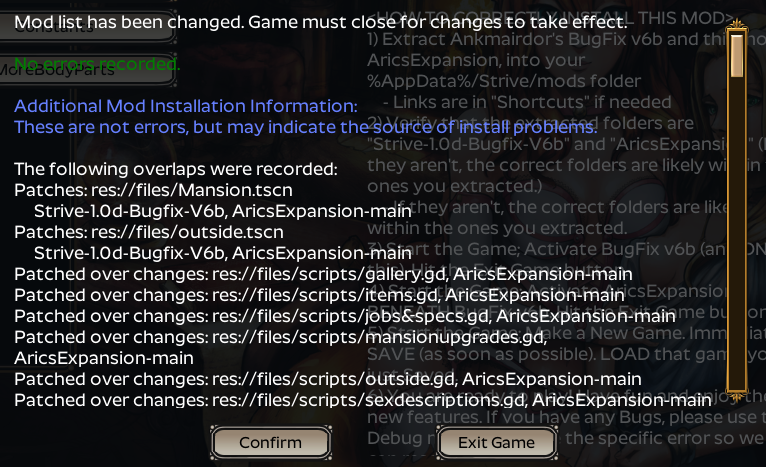
I get these exact set of errors when I install AricsExpansion without first installing the Bugfix mod and restarting the game. There are a few bugs in the mod system which prevent AricsExpansion from installing correctly so the game must restart in order to be running the fixed modding system. Also, you may shorten this post to after the first two ERROR lines and delete the second post as those are simply the same two errors repeated for a few dozen files.

I've installed the bugfix and restarted the game multiple times and still get this error. I've deleted the game and mods and reinstalled them. I've moved game folder to different locations, and I tried deleting the backup and roaming folder.

I followed the instructions by applying the bugfix first, restarting the game, then applying the expansion. 

Is it because I'm extracting both the bugfix and expansion into the mods folder at the same time?

(1 edit)

Are you using Bugfix version 6b? You are not getting the necessary fixes to the mod system. Since you are not listing any errors when opening the Mods menu, this eliminates various OS and folder permissions problems, so there should be no need to change locations. Also no errors listed for when installing the Bugfix indicates no folder permissions problems.
The data in the user/app data folder is almost always safe from corruption and does not need to be deleted. Deleting the Strive program folder after a failed install is a good practice to avoid using corrupt files. Deleting only the backup folder is a good way to make the current state of your game files permanent, as the game will use the current game files to create new ones, though this is rarely advisable as it can cause problems when installing mods. The mods can be extracted into the Strive mods folder at any time before the start of the game as they only affect the install process and game files if they are selected when Apply is pressed.

Yes I am using bugfix 6b. I only receive errors when applying the Aric's expansion mod.

I did noticed something when going through the errors 

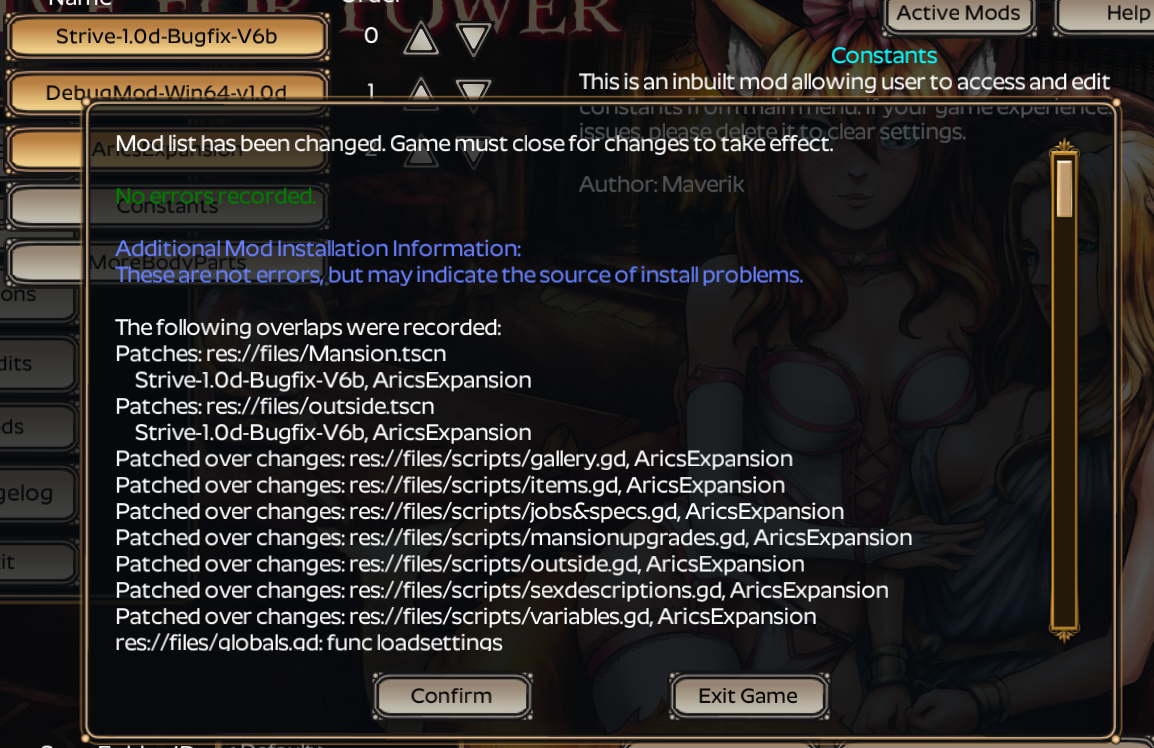
Additional Mod Installation Information: 

These are not errors, but may indicate the source of install problems

ERROR: copy: Failed to open res://backup/.import/woman_crawl_clothed.png-dc9866f9e7d4695632e4160db759c118.md5

   At: core/os/dir_access.cpp:307

ERROR: Copying backup file res://.import/woman_crawl_clothed.png-dc9866f9e7d4695632e4160db759c118.md5  Error code(7): File: not found

ERROR: copy: Failed to open res://backup/.import/woman_crawl_clothed.png-dc9866f9e7d4695632e4160db759c118.stex

   At: core/os/dir_access.cpp:307

ERROR: Copying backup file res://.import/woman_crawl_clothed.png-dc9866f9e7d4695632e4160db759c118.stex  Error code(7): File: not found

ERROR: copy: Failed to open res://files/aric_expansion_images/abils/panic.png.import

   At: core/os/dir_access.cpp:307

ERROR: Patching file res://files/aric_expansion_images/abils/panic.png.import  Error code(7): File: not found
ERROR: copy: Failed to open res://files/aric_expansion_images/backgrounds/eeriegrove.png.import

   At: core/os/dir_access.cpp:307

ERROR: Patching file res://files/aric_expansion_images/backgrounds/eeriegrove.png.import  Error code(7): File: not found
ERROR: copy: Failed to open res://files/aric_expansion_images/backgrounds/elvenforest.png.import

   At: core/os/dir_access.cpp:307

ERROR: Patching file res://files/aric_expansion_images/backgrounds/elvenforest.png.import  Error code(7): File: not found

ERROR: copy: Failed to open res://files/aric_expansion_images/backgrounds/marshlands.png.import

   At: core/os/dir_access.cpp:307

ERROR: Patching file res://files/aric_expansion_images/backgrounds/marshlands.png.import  Error code(7): File: not found

ERROR: copy: Failed to open res://files/aric_expansion_images/backgrounds/newamberroad.png.import

   At: core/os/dir_access.cpp:307

ERROR: Patching file res://files/aric_expansion_images/backgrounds/newamberroad.png.import  Error code(7): File: not found

Does this explain anything?

(2 edits)

Part of the fixes to the mod system was changing an incorrect directory function which prevented the mod system from creating new folders when patching, which is the source of the errors when patching files to aric_expansion_images. Manually adding that folder will remove those errors, but it's not a reasonable solution.

It's possible your backup folder is corrupt from deleting it but keeping the rest of the program folder while Aric's mod was installed, but using a fresh extraction of the game would solve that. Any permissions issues would raise errors long before the mods were applied.

Also your copied messages are self contradictory as you copied it incorrectly.

I've tried using a fresh extraction of the game and mod multiple times and still received the same errors. I would like to know what you mean by manually adding a folder? 

What folder would I add and where, in the Aric expansion mod folder or within the game folder.

(3 edits)

The Windows explorer can be used to create folders within the Strive program folder instead of waiting for the mod system to create them. There are folders within ".../Strive/mods/AricsExpansion/patch/" that do not correspond to folders within the Strive program folder. For instance, in "res://files/aric_expansion_images/abils/panic.png.import" from the the errors you just gave "res://" refers to your Strive program folder, which contains the "files" folder. However there will not be the folders "aric_expansion_images/abils" within that folder, so the panic png.import file cannot be copied to there.

Edit: Many of your errors are a missing folder in the backup folder "res://backup/.import".

If you downloaded Strive from somewhere other than itch.io then it's possible your game folder is corrupt, which would explain the contradictions in how the mod system interacts with your Strive program folders.

Otherwise there have been rare cases where a computer has weird permissions everywhere and the best solution is to put the game folder in the roaming folder beside the game's user data folder since this usually provides all necessary permissions to edit files and folders.

Okay I've resolved my issue. the problem was on my end, I installed the DebugMod for v1.0d instead of the Bugfix-V6b on itch.io 

Sorry for wasting your time.

No problem, at least it all makes sense now.

Do I need to apply the Constant?

No, but it can help you change the settings of the mod once it works.

Hi =)

It been a long time since i have play that game and i was happy to see a new update of that mod =)

But i struggle to understand how enchanting work exactly, i figured you would need certain material from the dialog but not sure if you can really do it atm or if i need to unlock something first.

Thank by advance for any information =)

hi I'm having trouble getting the mod to work, I'll follow it step by step, only bugfix mod, apply, restart, add aric's beneath, apply, get the follow not-error, close the game, and then the game will crash on launch- I'm just confused where I went wrong :( (I already made sure the folders were direct access (/mods/arics/patchetc)

Are you getting any bugs in the debug console, if you're launching with it? If so, can you post them here for us to examine?
Without any errors being shown, I can make a few guesses at what happened. Have you changed the name of the mod within the file to anything but "AricsExpansion"? It should be very specifically "mods/AricsExpansion/" then the files. As you posted, if you extract it so it has "mods/AricsExpansion/AricsExpansion" OR the folder name is changed (to just arics, like in your example) that it will crash on launch. 

I agree with Aric's assessment, a wrong folder name makes the most sense as the cause, but I'd like to clarify some details.

Without the Debug Mod(https://itch.io/t/1137280/debugmod-v10d), most users won't get any debug console and some OS require launching the game through Command Prompt to get one.

Both the current mod system and AricsExpansion can handle non-direct folder locations for the mod so anything like ".../mods/.../AricsExpansion/" will work, but the folder containing "info.txt" must be named "AricsExpansion". The usual culprit is that GitHub names the Zip archive "AricsExpansion_main", which results in an incorrect folder name when extracted.

sometime after posting i discovered the itch.io page for aric's and tried that one as well in the slim chance that the github was source code or something (I have accidentally done that on several occassions) and still get the same errors, launching with only bugfix + debug give no errors

(2 edits)

Please be sure to read the instructions for the Debug mod. It explicitly states that it is a manual patch and not installed using the mod system, so selecting it in the Mods menu will have no effect.

From what I can make out from the screenshot your "AricsExpansion" is spelled correctly, so you have some other issue.

Also, the mods are essentially always source code as the game is open source and the mod system works by editing the game's code to include the mod's code.

(+1)

oh that explains it! i didn't realize that's how debug mode worked ^^' unselected it in the mod menu + put it in the right spot and everything's working fine now! my guess is the first go around was the aricsexpansion-main issue and then i was a dunderhead with debug mode, thank you so much! (misunderstood the ingame instructions of debug as it not being visible right away/in the mod menu, not that it wouldn't be in the mod folder until i looked at the txt file)

Glad to hear you got it sorted out!

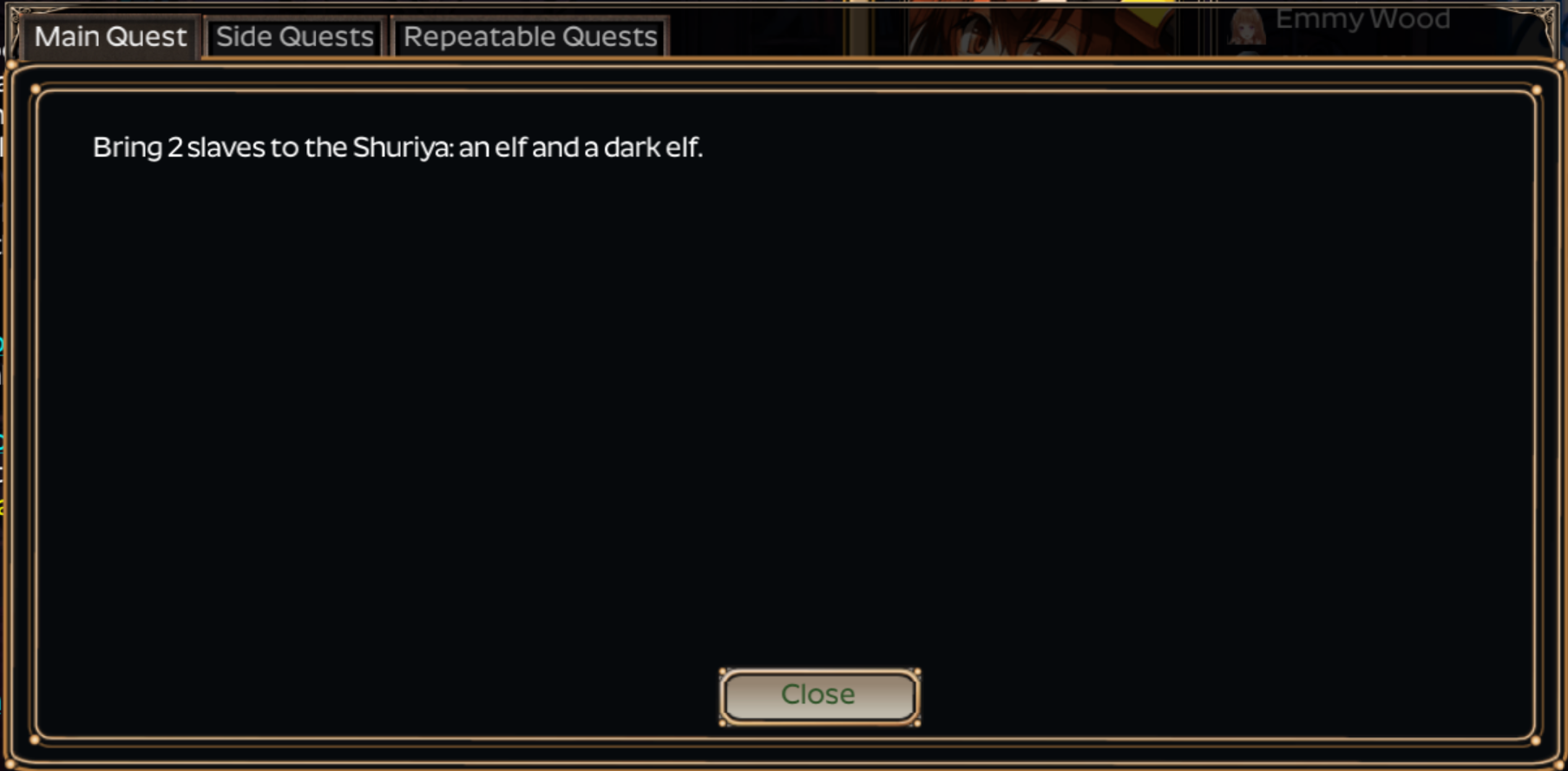
Hi, I'm using this mod, and I noticed that I am stuck in this part of the quest. appearantly it was due to all the drow and dark elve are named into tribal elf instead, now I have tribal elf but cannot submit them, is there anyone know a way to let me pass this part of the quest?

You are overthinking your problem and it has nothing to do with this mod. Version 1.0 of the unmodded game made the following changes to race names:

  • "Dark Elves" are renamed to "Tribal Elves"
  • "Drow" are renamed to "Dark Elves"

Dark Elves can be found in the Elven Grove.

Ahh I see, I couldn't find out where I can get dark elves so I assumed that they all renamed into tribal elves, just find some dark elves after some grinding. Thanks a lot, you rock!

Did I not install the mod properly, I ran into a bug where my game crashes on day end as one of my slaves gives birth. I'm
not sure if something didn't install correctly or if a file is missing

Error Log from the debug mod, game crashes without it

SCRIPT ERROR: getBabyDescription: Invalid get index 'fullfeathers' (on base: 'Dictionary').

          At: res://files/scripts/characters/description.gd:486

SCRIPT ERROR: childbirth: Invalid operands 'String' and 'Nil' in operator '+'.

          At: res://files/scripts/Mansion.gd:3321


(2 edits)

No, this is an old error that was never fixed. The baby has a description problem because babies don't use the standard data. It can be fixed with any plain text editor.

After line 354( or anywhere inside of "dict"), of ".../mods/AricsExpansion/scripts/characters/description.gd", a new line needs to be added for feathers_and_fur. I just copied the normal entry from lower down in the file:

feathers_and_fur = '$His body is sparsely covered with [color=aqua][feathercolor] bird-like feathers[/color]. Beneath that is thick, soft [color=aqua]fur of [furcolor]', 

Although [furcolor] doesn't work because it was only added to the normal description function, it doesn't cause any errors.

Edit: another description line is missing from "dict" and can also be added next to the feathers_and_fur line.

fullfeathers = '$His body is covered with [color=aqua][feathercolor] feathers[/color]. ',

Since this change is made to the mod file, you will need to re-apply the mods to update the game files. No need to go through the full install process, simply press Apply and restart when done.

It worked! Thank you Ankmairdor

(+2)

Aric, the credit companies are going after NSFW /Itch so if possible please write and combine the mod with updated guidance to install game/mods/new images, as I fear it won't be long they come for this game and I want to download it all once again as safety measure, but it was a long time since I installed it with mods and all. Thank You.

(1 edit)

How can I change the default option of what to do with defeated enemies back to leave instead of rape? It's very tedious to have to change it back to 'leave' every time.

In ".../Strive/mods/AricsExpansion/customScripts/expansionsettings.gd" you can change the value of capturedSelect to your preference. The comment above that variable explains the values. The Constants mod can be used to easily chance many of the values, but support for that type of value was never added to either mod.

Thank you!

(1 edit)

Dear dev, I was keeping up with the mod development for years and thank you for this feat of coding.

Would you be so kindly to add one last update that always was overlooked either by very Maverik themselves and other moddders that includes:

1. Please do add more clothes that would've suit both the "master of the house" and to "mistress of the house" to the Wimborn's boutique: 

    An "noble attire" for male that increases luxury and "evening dress" for lady;

2. Please do add Beastkin Panda race, since for years there was no any Ursid in the game.

3. Please do add Crossbows for purchase, not just mere bows.


Thank you for near re-invention of the much loved classic game!


P.S.

Should've asked this earlier but I'm unbelievably closed fella'.

Viewing posts 741 to 750 of 750 · Previous page · First page